
Mazda 3 Owners Manual: Jack
To remove the jack
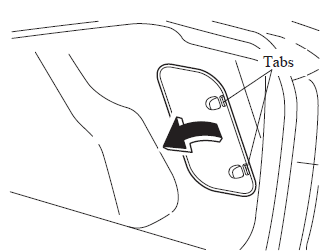
- (4–Door)
Push the tabs and remove the cover.
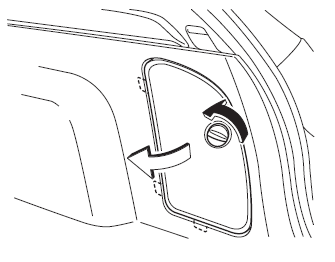
(5–Door)
Turn the knob and remove the cover.
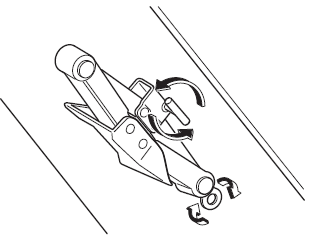
- Turn the wing bolt and jack screw counterclockwise.
To secure the jack
- Insert the wing bolt into the jack with the jack screw pointing to the down and turn the wing bolt clockwise to temporarily tighten it.
- Turn the jack screw in the direction shown in the figure.
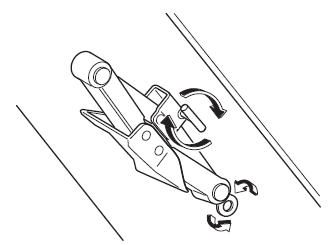
- Turn the wing bolt completely to secure the jack.
NOTE If the jack is not completely secured, it could rattle while driving. Make sure the jack screw is sufficiently tightened.
- Insert the cover tabs and install the cover.
(4-Door)
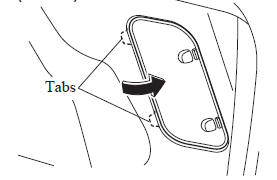
(5-Door)
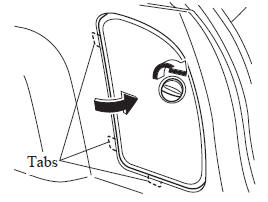
NOTE Verify that the cover is securely installed.
Maintenance
- Always keep the jack clean.
- Make sure the moving parts are kept free from dirt or rust.
- Make sure the screw thread is adequately lubricated.
 Spare Tire and Tool Storage
Spare tire and tools are stored in the locations illustrated in the diagram.
4-Door
5-Door
...
 Spare Tire
Your Mazda has a temporary spare tire.
The temporary spare tire is lighter and
smaller than a conventional tire, and is
designed only for emergency use and
should be used only for VERY short
pe ...
Other materials:
Automatic Transaxle Fluid (ATF) Adjustment [Fw6 A EL]
CAUTION:
Only adjust the ATF level when the ATF temperature is 45—55 °C {113—131 °F}.
If the ATF level is incorrect, it could damage the transaxle.
Do not add ATF over the specification. Otherwise, the transaxle performance
could be reduced and ATF could leak.
1. Re ...
Assist Handle Removal/Installation
Assist Handle Removal
1. Insert a flathead screwdriver into the service hole and remove the assist
handle covers.
2. Remove the assist handle in the direction of the arrow (1) and (2), while
detach the clip.
NOTE:
Remove the assist handle by shaking it up and down.
Ass ...
Keyless Antenna Removal/Installation
Interior, Front
1. Disconnect the negative battery cable..
2. Remove the following parts:
a. Upper panel.
b. Shift knob (MTX).
c. Selector lever knob (ATX).
d. Shift panel.
e. Side wall.
f. Center panel.
g. Audio unit.
h. Rear heat duct (1).
3. Disconnect the connector.
4. ...
