
Mazda 3 Owners Manual: Spare Tire
Your Mazda has a temporary spare tire.
The temporary spare tire is lighter and smaller than a conventional tire, and is designed only for emergency use and should be used only for VERY short periods. Temporary spare tires should NEVER be used for long drives or extended periods.
| WARNING
Do not install the temporary spare tire
on the front wheels (driving wheels):
Driving with the temporary spare tire
on one of the front driving wheels is
dangerous. Handling will be aff ected. You could lose control of the vehicle, especially on ice or snow bound roads, and have an accident. Move a regular tire to the front wheel and install the temporary spare tire to the rear. |
CAUTION
|
To remove the spare tire
- Lift the trunk/luggage compartment mat.
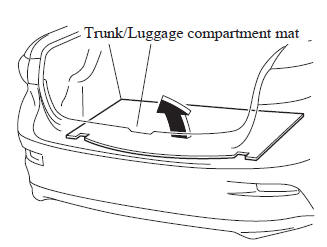
- Turn the spare tire hold-down bolt counterclockwise.
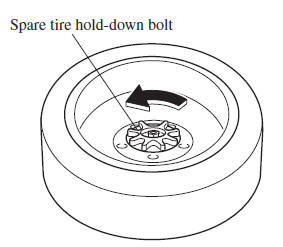
To secure the spare tire
Store the spare tire in the reverse order of removal. After storing, verify that the spare tire is stored securely
 Jack
Jack
To remove the jack
(4–Door)
Push the tabs and remove the cover.
(5–Door)
Turn the knob and remove the cover.
Turn the wing bolt and jack screw
counterclockwise.
To s ...
 Changing a Flat Tire
NOTE
If the following occurs while driving, it
could indicate a flat tire.
Steering becomes difficult.
The vehicle begins to vibrate
excessively.
The vehicle pulls in one direction.
If ...
Other materials:
Dynamic Stability Control
(DSC)
The Dynamic Stability Control (DSC)
automatically controls braking and engine
torque in conjunction with systems such
as ABS and TCS to help control side slip
when driving on slippery surfaces, or
during sudden or evasive maneuvering,
enhancing vehicle safety.
Refer to ABS and TCS .
DSC ...
Daytime Running Lights
Some countries require moving vehicles
to have their lights on (daytime running
lights) during the daytime.
Daytime running lights turn on
automatically when the ignition is
switched ON.
They turn off when the parking brake is
operated or the shift lever is shifted to the
P position (aut ...
Valve Clearance Adjustment [Mzr 2.0, Mzr 2.5]
1. Remove the battery cover..
2. Disconnect the negative battery cable.
3. Remove the plug hole plate..
4. Disconnect the wiring harness.
5. Remove the ignition coils..
6. Remove the spark plugs..
7. Remove the ventilation hose.
8. Remove the oil level gauge.
9. Remove the cylinder h ...
