
Mazda 3 Owners Manual: Inside Trunk Release Lever (4-Door)
Your vehicle is equipped with an inside trunk release lever that provides a means of escape for children and adults in the event they become locked inside the trunk.
No matter how careful adults might be with keys and locking their cars, parents should be aware that children may be tempted to play around vehicles and use the trunk as a hiding place.
Adults are advised to familiarize themselves with the operation and location of the inside trunk release lever so that all children can be told about it in an appropriate way, keeping in mind that most vehicles do not have such levers.
| WARNING
Close the trunk lid, be sure the seat
backs are latched and do not allow
children to play inside the vehicle:
Leaving the trunk lid open or leaving
children in the vehicle with the keys is
dangerous. Children could open the
trunk lid and climb inside resulting
in possible injury or death from heat
exposure.
Always keep the car from being a tempting place to play by latching the rear seats, doors and the trunk, and keeping the keys where children can not play with them: Leaving children or animals unattended in a parked vehicle is dangerous. Babies left sleeping and children who lock themselves in cars or trunks can die very quickly from heat prostration. Do not leave your children or pets alone in a car at any time. Do not leave the car, the rear folding seats or the trunk unlocked. |
Opening the Trunk Lid from the Inside
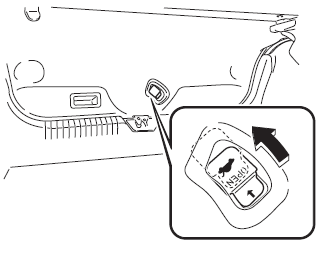
Slide the inside trunk release lever in the direction of the arrow. The lever is made of material that will glow for hours in the darkness of the trunk following a brief exposure to ambient light.
The inside trunk release lever is located on the inside of the trunk lid.
 Luggage Compartment
Luggage compartment cover (5-door)
WARNING
Do not place anything on top of the
cover:
Placing luggage or other cargo on top
of the luggage compartment cover is
dangerous. During ...

Other materials:
Glass Antenna Inspection
4SD
1. Disconnect the negative battery cable..
2. Disconnect the antenna amplifier connector B..
3. Disconnect the antenna feeder No.3 connector C. (with audio unit (with display)).
4. Inspect the glass antenna for damage visually.
5. Inspect for continuity between the glass antenna termin ...
Rear Wiper And Washer Switch Inspection
1. Disconnect the negative battery cable..
2. Remove the following parts:
a. Front scuff plate (Driver‘s side).
b. Front side trim (Driver‘s side).
c. Hood release lever.
d. Lower panel.
e. Column cover.
f. Wiper and washer switch.
3. Verify that the continuity between the rear w ...
Windshield Washer Nozzle Removal/Installation
1. Remove the following parts:
a. Windshield wiper arm and blade.
b. Front fender molding.
c. Cowl grille.
2. Remove the windshield washer hose from the windshield washer nozzle.
3. Squeeze the tabs of the windshield washer nozzle.
4. Pull the windshield washer nozzle out to remove it.
...
