
Mazda 3 Service Manual: Ion Sensor Inspection [Skyactiv G 2.0]
DTC Inspection
NOTE:
-
Because the ion sensor is integrated in the ignition coil, replacing the ion sensor includes replacement of the ignition coil/ion sensor.
1. Connect the M-MDS to the DLC-2.
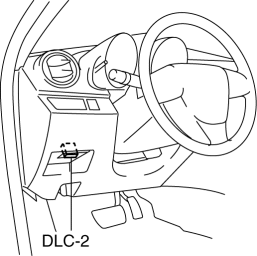
2. Perform the DTC inspection using the M-MDS..
-
If any DTC related to the ignition coil/ion sensor is present, repair the malfunctioning location according to the applicable DTC troubleshooting..
Visual Inspection
NOTE:
-
Because the ion sensor is integrated in the ignition coil, replacing the ion sensor includes replacement of the ignition coil/ion sensor.
1. Remove the battery cover..
2. Disconnect the negative battery cable..
3. Remove the plug hole plate..
4. Remove the ignition coil/ion sensor..
5. Verify that there is no damage to the ignition coil/ion sensor, and no corrosion and damage to the connector.
-
If there is a malfunction, replace the ignition coil/ion sensor..
 Front Seat Belt Removal/Installation [Two Step Deployment Control System]
WARNING:
Handling the front seat belt (pre-tensioner seat belt) improperly can accidentally
deploy the pre-tensioner seat belt, which may seriously injure you. Read the
air bag system se ...
 Neutral Switch Inspection [Mzr 2.0, Mzr 2.5]
Continuity Inspection
1. Remove the battery cover..
2. Disconnect the negative battery cable..
3. Disconnect the neutral switch connector..
4. When the shift lever is in neutral and in a positi ...
Other materials:
Available Language (Type A)
The available languages are English,
Spanish, and Canadian French. If the
language setting is changed, all of the
voice guidance and voice input commands
are done in the selected language.
NOTE
If the language setting is changed,
device registration is maintained.
Phonebook records are ...
Heated Oxygen Sensor (HO2 S) Removal/Installation [Mzr 2.0, Mzr 2.5]
WARNING:
A hot engine and exhaust system can cause severe burns. Turn off the engine
and wait until they are cool before removing the exhaust system.
1. Remove the battery cover..
2. Disconnect the negative battery cable..
3. Disconnect the HO2S connector.
4. Remove the HO2S u ...
Inside Trunk Release Lever
(4-Door)
Your vehicle is equipped with an inside
trunk release lever that provides a means
of escape for children and adults in the
event they become locked inside the trunk.
No matter how careful adults might be
with keys and locking their cars, parents
should be aware that children may be
tempted ...
