
Mazda 3 Service Manual: Joint Shaft Assembly [Mzr 2.5 (ATX)]
1. Assemble in the order indicated in the table.
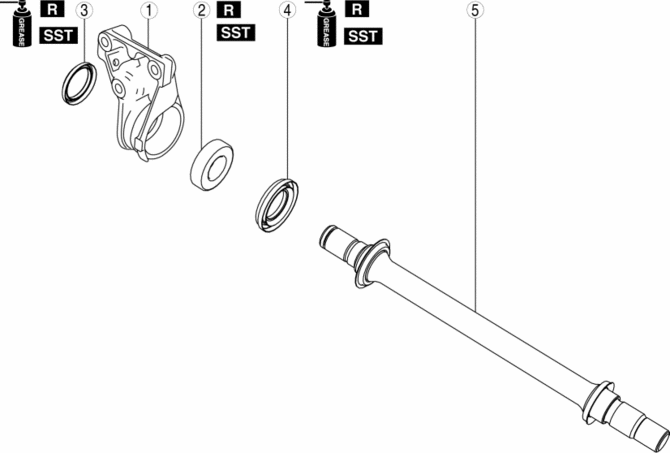
|
1 |
Bracket |
|
2 |
Bearing . |
|
3 |
Dust seal (RH) . |
|
4 |
Dust seal (LH) . |
|
5 |
Joint shaft . |
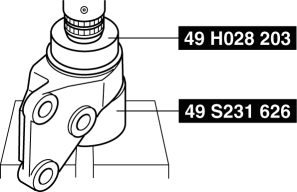
Bearing Assembly Note
1. Install a new bearing using the SSTs
.
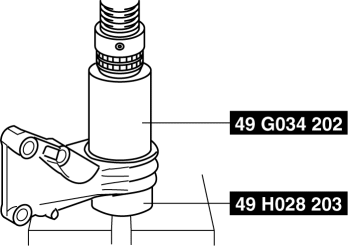
Dust Seal (RH) Assembly Note
1. Apply grease to a new dust seal lip.
2. Install the dust seal (RH) using the SSTs
.
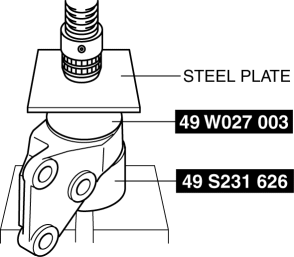
Dust Seal (LH) Assembly Note
1. Apply grease to a new dust seal lip.
2. Install a new dust seal (LH) using the steel plate and the SSTs
.
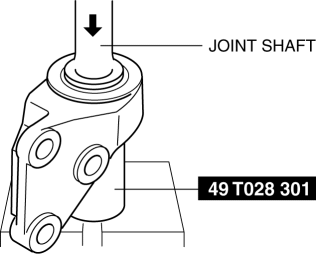
Joint Shaft Assembly Note
1. Press fit the joint shaft using the SST
and a press.
 Intermediate Sensor Removal/Installation [FS5 A EL]
CAUTION:
If foreign materials are stuck to the sensor, disturbance by magnetic flux
can cause sensor output to be abnormal and thereby negatively affect control.
Make sure that foreign m ...
 Judder Upon Torque Converter Clutch (TCC) Operation [Fw6 A EL]
TROUBLESHOOTING ITEM
Judder upon torque converter clutch (TCC) operation
DESCRIPTION
Vehicle jolts when TCC is engaged.
...
Other materials:
Heated Oxygen Sensor (HO2 S) Inspection [Mzr 2.0, Mzr 2.5]
HO2S Inspection
1. Connect the M-MDS to the DLC-2.
2. Switch the ignition to ON.
3. Warm up the engine to normal operating temperature.
4. Access the following PIDs using the M-MDS..
VSS (Vehicle speed)
RPM (Engine speed)
O2S12 (HO2S output voltage)
5. Drive ...
Ignition Switch Inspection [Without Advanced Keyless Entry And Push Button Start
System]
1. Disconnect the negative battery cable..
2. Remove the column cover..
3. Remove the ignition switch..
4. Verify that the continuity between the ignition switch terminals is as indicated
in the table.
If not as indicated in the table, replace the ignition switch.
...
Starting the Engine
WARNING
Radio waves from the key may aff ect
medical devices such as pacemakers:
Before using the key near people who
use medical devices, ask the medical
device manufacturer or your physician
if radio waves from the key will aff ect
the device.
NOTE
The key mus ...
