
Mazda 3 Service Manual: Joint Shaft Removal/Installation [Skyactiv G 2.0]
CAUTION:
-
Performing the following procedures without first removing the ABS wheel-speed sensor may possibly cause an open circuit in the wiring harness if it is pulled by mistake. Before performing the following procedures, remove the ABS wheel-speed sensor connector (axle side) and fix it to an appropriate place where the sensor wiring harness will not be pulled by mistake while servicing the vehicle.
1. Remove the aerodynamic under cover No.2 and splash shield as a unit..
2. Drain the transaxle oil or ATF..
3. Remove in the order indicated in the table.
4. Install in the reverse order of removal.
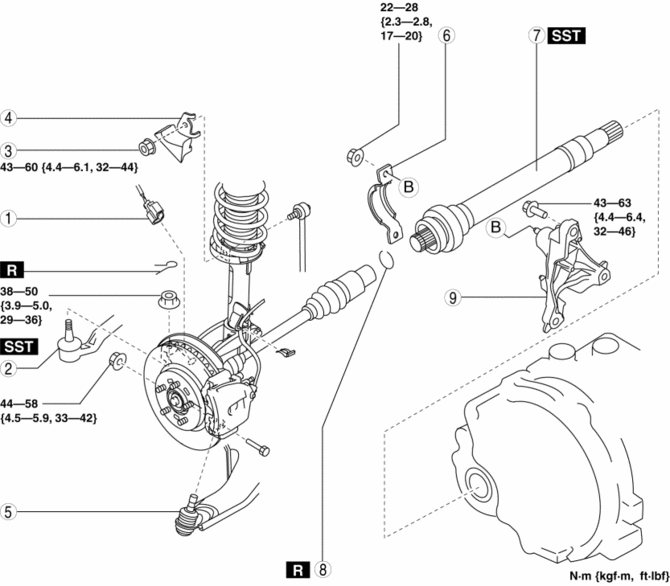
|
1 |
ABS wheel-speed sensor connector |
|
2 |
Tie-rod end ball joint . |
|
3 |
Stabilizer control link upper nut |
|
4 |
Dynamic damper |
|
5 |
Front lower arm ball joint . |
|
6 |
Joint shaft bracket No.2 (See Joint Shaft Bracket, Joint shaft Installation Note.) |
|
7 |
Joint shaft . |
|
8 |
Joint shaft clip . |
|
9 |
Joint shaft bracket No.1 (See Joint Shaft Bracket, Joint shaft Installation Note.) |
Joint Shaft Removal Note
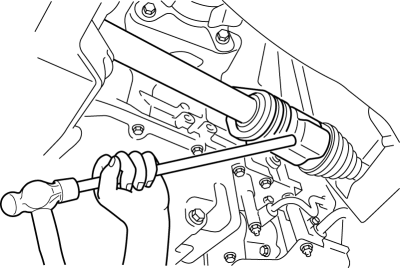
1. Disconnect the drive shaft (RH) from the joint shaft by tapping the transaxle side outer ring with a brass bar and hammer.
2. Remove the joint shaft bracket No.2 from the joint shaft bracket No.1.
3. Remove the joint shaft.
CAUTION:
-
The sharp edges of the joint shaft can slice or puncture the oil seal. Be careful when removing the joint shaft from the transaxle.
Joint Shaft Clip Installation Note
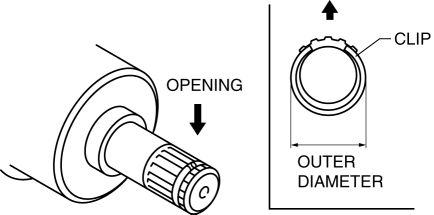
1. Install a new joint shaft clip to the clip groove at the end of the joint shaft with the clip opening facing upward and the clip width within the specification.
2. After installation, measure the outer diameter.
-
If it exceeds the specification, repeat installation using a new clip.
-
Standard
-
31.2 mm {1.23 in} or less
Joint Shaft Bracket, Joint shaft Installation Note
CAUTION:
-
Retighten the Joint shaft bracket No.1 stud bolts when the Joint shaft bracket No.2 nuts are loosened
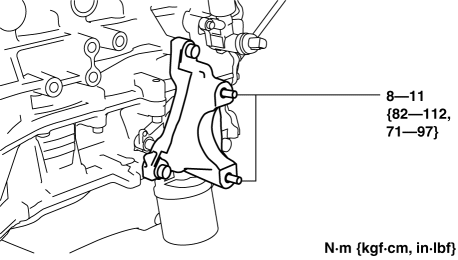
1. Tighten the joint shaft bracket No.1 stud bolts.
-
Tightening torque
-
8—11 N·m {82—112 kgf·cm, 71—97 in·lbf}
2. Temporarily tighten the bolts A and B.
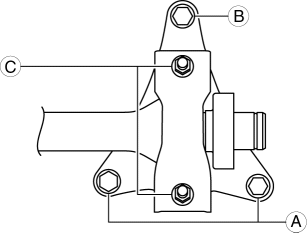
3. Tighten the bolts A, then tighten the bolt B to the specified torque.
-
Tightening torque
-
42—62 N·m {4.3—6.3 kgf·m, 31—45 ft·lbf}
4. Install the joint shaft into the transaxle.
5. Temporarily tighten the nuts C, then tighten the nuts C to the specified torque.
-
Tightening torque
-
22—28 N·m {2.3—2.8 kgf·m, 17—20 ft·lbf}
Front Lower Arm Ball Joint Installation Note
NOTE:
-
The bolt insertion direction can be either front or rear of the vehicle, however, keep the insertion direction the same on both the left and right sides of the vehicle.
 Joint Shaft Removal/Installation [Mzr 2.0, Mzr 2.3 Disi Turbo, Mzr 2.5]
CAUTION:
Performing the following procedures without first removing the ABS wheel-speed
sensor may possibly cause an open circuit in the wiring harness if it is pulled
by mistake. Before ...

Other materials:
Operating Tips for OGG
OGG is the audio compression format for
Xiph. Org Foundation.
Audio data can be created and stored at a
higher compression ratio than MP3.
This unit plays files with the extension
(.ogg) as OGG files.
CAUTION
Do not use an audio fi le extension on
fi les other than audio fi le ...
Inner Garnish Removal/Installation
1. Disconnect the negative battery cable..
2. Pull the inner garnish in the direction of the arrow shown in the figure and
remove it while detaching clips and tab.
CAUTION:
When pulling out the inner garnish, be careful not to damage the tab.
3. Disconnect the front tweeter c ...
Cargo and luggage
When using the Subaru Solterra, carefully follow these guidelines
regarding cargo handling, storage safety, and load capacity to maintain optimal
vehicle performance and passenger protection.
Proper loading in the Subaru Solterra not only improves driving stability
but also helps prevent unne ...
