
Mazda 3 Service Manual: License Plate Light Bulb Removal/Installation
1. Disconnect the negative battery cable..
2. Insert a tape-wrapped fastener remover to the position shown in the figure, release the tabs, and remove the lens.
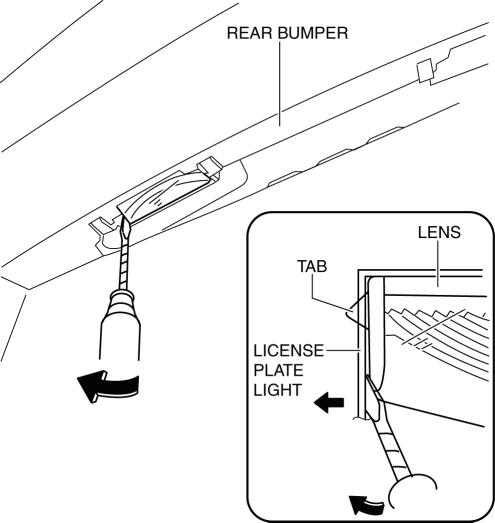
3. Remove the license plate light bulb.
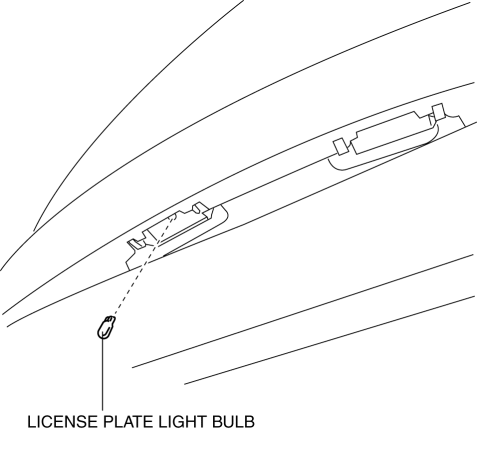
4. Install in the reverse order of removal.
 High Mount Brake Light Removal/Installation
4SD
1. Disconnect the negative battery cable..
2. Remove the trunk lid trim..
3. Disconnect the connector.
4. Remove the nuts.
5. While pressing the tabs shown in the figure, pull the hig ...
 License Plate Light Removal/Installation
1. Disconnect the negative battery cable..
2. Remove the lens..
3. Insert a tape-wrapped fastener remover to the position shown in the figure,
release the tabs.
4. Pull the rear bumper in ...
Other materials:
Antenna Amplifier Removal/Installation
With Audio Unit (Without Display)
1. Disconnect the negative battery cable..
2. Remove the rain sensor cover. (Vehicles with auto light/wiper system).
3. Disconnect the rain sensor connector. (Vehicles with auto light/wiper system)
4. Partially peel back the seaming welts.
5. Remove the fo ...
Ion Sensor Inspection [Skyactiv G 2.0]
DTC Inspection
NOTE:
Because the ion sensor is integrated in the ignition coil, replacing the
ion sensor includes replacement of the ignition coil/ion sensor.
1. Connect the M-MDS to the DLC-2.
2. Perform the DTC inspection using the M-MDS..
If any DTC related to the ...
Recommended Oil
U.S.A., Canada, and Puerto Rico
Use SAE 0W-20 engine oil.
Mazda Genuine Oil is used in your
Mazda vehicle. Mazda Genuine 0W-20
Oil is required to achieve optimum fuel
economy.
For maintenance service, Mazda
recommends Mazda Genuine Parts and
Castrol ® (U.S.A. only).
Only use SAE 0W ...
