
Mazda 3 Service Manual: Light Switch Inspection
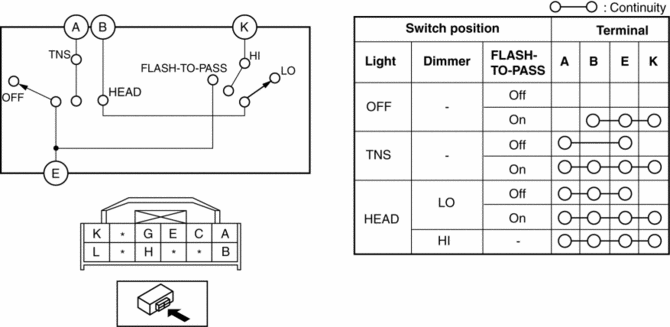
Vehicles Without Auto Light System
1. Disconnect the negative battery cable..
2. Remove the column cover..
3. Remove the light switch..
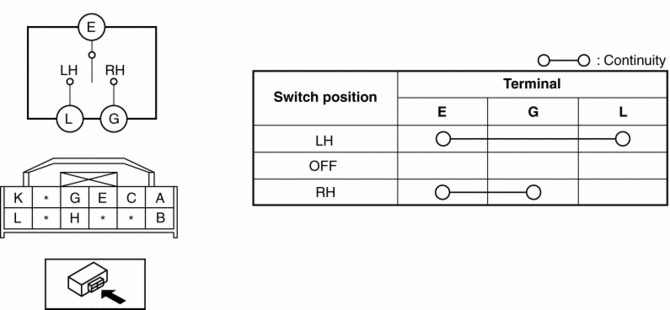
4. Verify that the continuity between the light switch terminals is as indicated in the table.
-
If not as indicated in the table, replace the light switch.
Light Switch
Turn Switch
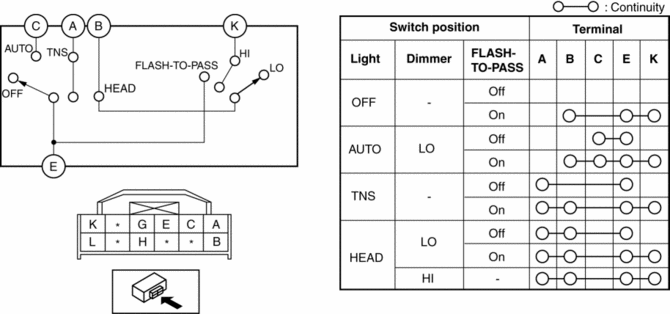
Vehicles With Auto Light System
1. Disconnect the negative battery cable..
2. Remove the column cover..
3. Remove the light switch..
4. Verify that the continuity between the light switch terminals is as indicated in the table.
-
If not as indicated in the table, replace the light switch.
Light Switch
Turn Switch

 Light Switch Removal/Installation
1. Disconnect the negative battery cable..
2. Remove the column cover..
3. Disconnect the connector.
4. Remove the screws shown in the figure, then remove the light switch by pulling
it in ...
Other materials:
Headlight Aiming
CAUTION:
If the headlight aiming is adjusted with cargo in the vehicle, it may not
adjust correctly. Adjust the headlight aiming with the vehicle under the following
conditions:
No occupants inside vehicle
Cargo other than spare tire, jack, and tools not loaded
...
PID/Data Monitor Inspection [Afs (Adaptive Front Lighting System)]
1. Connect the M-MDS (IDS) to the DLC-2.
2. After the vehicle is identified, select the following items from the initialization
screen of the IDS.
a. Select “DataLogger”.
b. Select “Modules”.
c. Select “AFS”.
3. Select the applicable PID from the PID table.
4. Verify th ...
Steering Switch Inspection
Without Bluetooth System
WARNING:
Handling the air bag module improperly can accidentally deploy the air bag
module, which may seriously injure you. Read the air bag system service warnings
and cautions before handling the air bag module..
1. Disconnect the negative battery cabl ...
