
Mazda 3 Service Manual: Light Switch Removal/Installation
1. Disconnect the negative battery cable..
2. Remove the column cover..
3. Disconnect the connector.
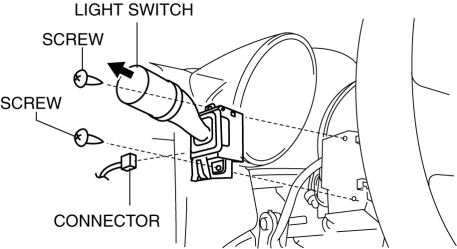
4. Remove the screws shown in the figure, then remove the light switch by pulling it in the direction of the arrow.
5. Install in the reverse order of removal.
 Light Switch Inspection
Vehicles Without Auto Light System
1. Disconnect the negative battery cable..
2. Remove the column cover..
3. Remove the light switch..
4. Verify that the continuity between the light switch te ...
 Exterior
...
Other materials:
Compression Inspection [Skyactiv G 2.0]
WARNING:
Hot engines and oil can cause severe burns. Be careful not to burn yourself
during removal/installation of each component.
Fuel vapor is hazardous. It can very easily ignite, causing serious injury
and damage. Always keep sparks and flames away from fuel.
Fuel ...
Antenna Feeder No.7 Inspection
1. Disconnect the negative battery cable..
2. Remove the liftgate upper trim..
3. Disconnect the connector A and B..
4. Verify that the continuity between antenna feeder No.7 terminals is as indicated
in the table.
If not as indicated in the table, replace antenna feeder No.7.
...
Manual Transaxle Removal/Installation [C66 M R]
1. Remove the battery cover..
2. Disconnect the negative battery cable..
3. Remove the aerodynamic under cover No.2 and the splash shield as a single
unit..
4. Drain the manual transaxle oil..
5. Disconnect and/or remove the following parts in the engine compartment.
a. Remove the batte ...
