
Subaru Solterra 2023-2026 Owner's Manual: Luggage compartment features
Cargo hooks
In the Subaru Solterra, cargo hooks are designed to provide convenient anchoring points for securing loose items within the luggage compartment, helping to prevent movement during driving.
Lift the hooks upward when needed for use, ensuring proper positioning before attaching straps or ropes.
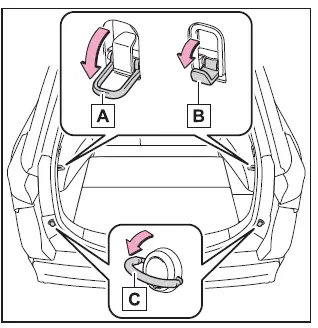
- Upper hook (rope hook)
- Upper hook (utility hook)
- Lower hook
WARNING
■ When cargo hooks are not in use
To reduce the risk of injury inside the Subaru Solterra, always return unused hooks to their original stowed position.
NOTICE
■ To prevent damage to the upper hook (utility hook)
Do not hang objects exceeding 8 lb. (4 kg) on the upper utility hook in the Subaru Solterra, as excessive weight may cause damage.
Deck board
■ Changing the deck board positions
The Subaru Solterra features an adjustable deck board, allowing the cargo floor height to be modified for improved storage flexibility and space utilization.
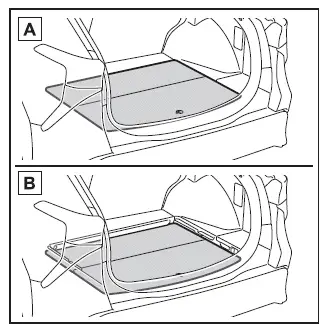
- Upper
- Lower
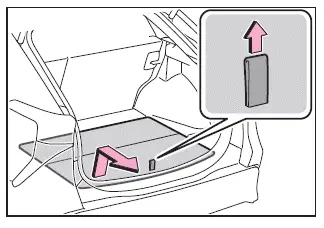
1. Lift the tab to raise the deck board, then pull it toward you to remove it from its current position.
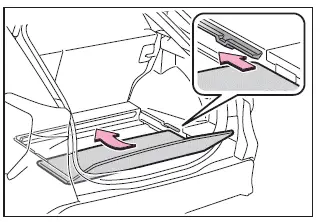
2. Insert the deck board into the desired groove and slide it forward to secure it in place.
■ Setting the deck board upright
When accessing tools or the lower compartment in the Subaru Solterra, the deck board can be positioned vertically for easier handling.
If the underside (resin surface) is facing upward, rotate it back to the correct orientation before use.
1. Pull up the tab and fold the deck board forward.
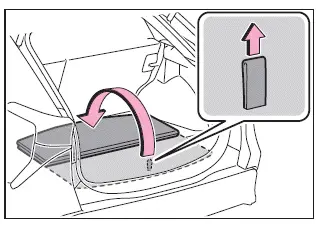
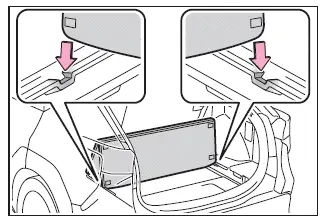
2. Place the edge of the deck board into the designated slots to hold it upright securely.
WARNING
■ When operating the deck board
Do not place objects on the deck board while adjusting it in the Subaru Solterra.
This may result in finger injury or unintended accidents.
■ Caution while driving
Always keep the deck board closed securely when driving the Subaru Solterra.
Loose or open panels may cause injury during sudden braking or collisions.
Deck under tray
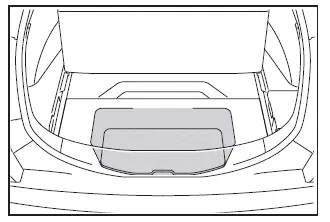
The underfloor storage tray in the Subaru Solterra can be accessed by lifting the deck board using the tab and folding it forward.
WARNING
■ Caution while driving
Ensure the deck board is properly closed before driving the Subaru Solterra to prevent injuries caused by shifting components or stored items.
■ Warning reflector
Depending on its size and shape, the warning reflector case may not fit securely in the designated storage area of the Subaru Solterra.
Luggage cover (if equipped)
■ Removing the luggage cover unit
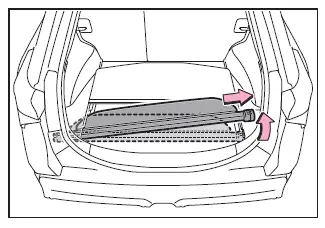
1. Lift the deck board and fold it forward.
2. Carefully remove the luggage cover unit from its storage location in the Subaru Solterra.
■ Installing the luggage cover
1. Compress both ends of the luggage cover and insert them into the designated mounting recesses.
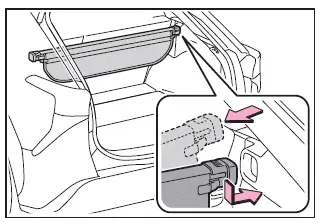
2. Extend the cover and attach it securely to the anchor points.
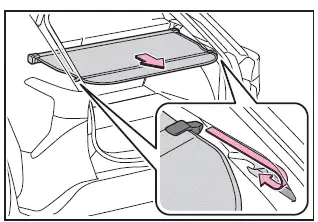
■ Removing the luggage cover
1. Detach the cover from both side anchors and allow it to retract smoothly.
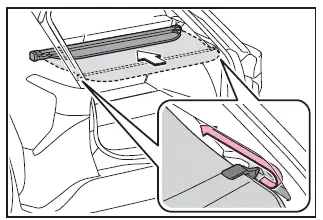
2. Compress the ends and lift the luggage cover out of the mounting position.
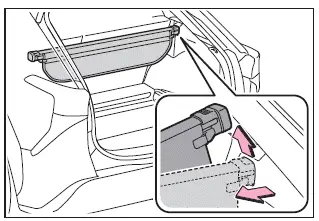
■ Stowing the luggage cover unit
1. Raise and fold the deck board forward.
2. Compress both ends of the luggage cover until they lock into position.
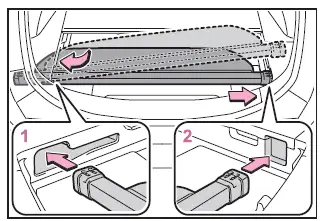
- Insert the left side into the designated groove.
- Insert the right side into the opposite groove to secure the unit.
WARNING
■ Luggage cover
- Ensure the luggage cover in the Subaru Solterra is properly installed or stored. Improper placement may result in injury during sudden braking or a collision.
- Do not place any objects on top of the luggage cover. Items may become airborne and cause injury.
- Prevent children from climbing on the luggage cover, as this may damage the component and lead to serious injury.
 List of storage features
Location of the storage features
Bottle holders
Card holders
Cup holders
Auxiliary box (if equipped)
Console box
Open tray
WARNING
■ Items that should not be left in the v ...
 Using the other interior features
The versatile luggage compartment design of the Subaru Solterra enhances
practicality, offering flexible storage solutions while maintaining safety and ease
of use for everyday driving needs. ...
Other materials:
Cruise control
In the Subaru Solterra, cruise control allows the vehicle to maintain
a constant speed without continuous pressure on the accelerator pedal, providing
a more relaxed and efficient driving experience on long journeys.
The Subaru Solterra cruise control system is intended for use on
highways an ...
Flashing the Headlights
To flash the headlights, pull the lever fully
towards you (the headlight switch does not
need to be on).
The headlight high-beam indicator light
in the instrument cluster illuminates
simultaneously. The lever will return to the
normal position when released.
...
Oil Pump Removal/Installation [Skyactiv G 2.0]
WARNING:
Hot engines and engine oil can cause severe burns. Turn off the engine and
wait until it and the engine oil have cooled.
A vehicle that is lifted but not securely supported on safety stands is dangerous.
It can slip or fall, causing death or serious injury. Never work ...
