
Mazda 3 Service Manual: Master Cylinder Removal/Installation [Mzr 2.3 Disi Turbo]
1. Remove the battery and battery tray..
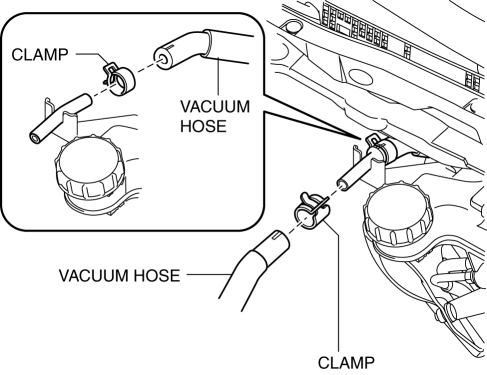
2. Pinch open the clamps using pliers and disconnect the vacuum hoses from the insulator bracket as shown in the figure.
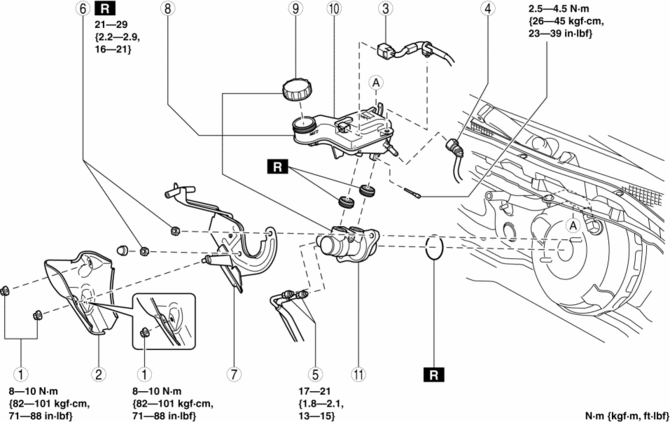
3. Remove in the order indicated in the table.
4. Install in the reverse order of removal.
|
1 |
Nut |
|
2 |
Insulator |
|
3 |
Brake fluid level sensor connector |
|
4 |
Reserve hose (See Reserve Hose Removal Note.) (See Reserve Hose Installation Note.) |
|
5 |
Brake pipe |
|
6 |
Nut |
|
7 |
Insulator bracket (See Insulator Bracket, Master Cylinder Removal Note.) (See Master Cylinder, Insulator Bracket Installation Note.) |
|
8 |
Master cylinder (See Insulator Bracket, Master Cylinder Removal Note.) (See Master Cylinder, Insulator Bracket Installation Note.) |
|
9 |
Cap |
|
10 |
Reserve tank |
|
11 |
Cylinder component |
Reserve Hose Removal Note
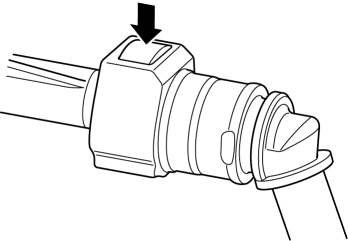
1. Remove the reserve hose from the reserve tank while pressing the point indicated by the arrow in the figure.
Insulator Bracket, Master Cylinder Removal Note
1. Remove the insulator bracket and master cylinder from the power brake unit as a single unit.
2. Remove the insulator bracket from the master cylinder.
Master Cylinder, Insulator Bracket Installation Note
1. Temporarily install the insulator bracket to the master cylinder.
2. Install the insulator bracket and master cylinder to the power brake unit as a single unit.
Reserve Hose Installation Note
1. Insert the reserve hose to the reserve tank until a click is heard.
2. Verify that the reserve hose is firmly installed by pulling it, and push it into the reserve tank again.
 Master Cylinder Removal/Installation [Mzr 2.0, Skyactiv G 2.0, Mzr 2.5]
1. Remove the battery and battery tray..
2. Remove in the order indicated in the table.
3. Install in the reverse order of removal.
1
Brake fluid level sensor connect ...
 Power Brake Unit Inspection
NOTE:
The following inspection methods are simple inspection methods to judge the
function of the power brake unit.
If there is any malfunction in the power brake unit, replace the ...
Other materials:
Before driving
Before operating your Subaru Solterra, carefully follow the recommendations
below to ensure maximum safety, proper vehicle control, and a confident driving
experience in all conditions.
Installing floor mats
Always use floor mats that are specifically engineered for the Subaru Solterra,
matc ...
Oil Seal (Differential) Replacement [G66 M R]
1. On level ground, jack up the vehicle and support it evenly on safety stands.
2. Remove the aerodynamic under cover No.2..
3. Drain the oil from the transaxle..
4. Remove the front splash shield..
5. Separate the drive shaft and joint shaft from the transaxle..
6. Remove the oil seals u ...
Replacing a Tire
WARNING
Always use tires that are in good condition:
Driving with worn tires is dangerous. Reduced braking, steering, and
traction could result
in an accident.
If a tire wears evenly, a wear indicator will appear as a solid band across
the tread.
Replace the tire when ...
