
Subaru Solterra 2023-2026 Owner's Manual: Multi-information display
Display and menu icons
■ Display
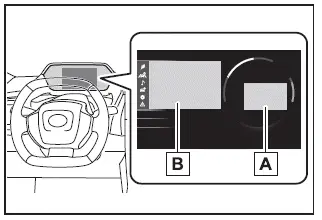
- Driving support system status display area
In the Subaru Solterra, this area dynamically presents visual information whenever
advanced driver assistance systems are active and a menu icon other than
 is selected:
- LDA (Lane Departure Alert)
- LTA (Lane Tracing Assist)
- LCA (Lane Change Assist)
- RSA (Road Sign Assist)
- Dynamic radar cruise control
- Cruise control
- PDA (Proactive driving assist)
- Content display area
The multi-information display in the Subaru Solterra allows the driver to access a wide range of real-time driving data by selecting different menu icons. It also serves as a central interface for adjusting display preferences and configuring various vehicle settings.
Depending on operating conditions, warning alerts or advisory pop-up messages may also appear to ensure the driver is informed about the Subaru Solterra status.
■ Menu icons
The menu icons are displayed by operating the meter control switches on the Subaru Solterra.
 Driving
information display
Driving
information display
 Driving
support system information display
Driving
support system information display
 Audio
system-linked display
Audio
system-linked display
 Vehicle
information display
Vehicle
information display
 Settings
display
Settings
display
 Warning
message display
Warning
message display
■ Liquid crystal display
As with many LCD panels, the Subaru Solterra display may show small bright or dark spots. This is a normal characteristic of liquid crystal technology and does not affect functionality or usability.
WARNING
■ Caution for use while driving
-
When interacting with the multi-information display in the Subaru Solterra while driving, always remain attentive to road conditions and surrounding traffic.
-
Avoid prolonged viewing of the display, as this may reduce awareness of pedestrians, obstacles, or changes in traffic ahead.
Changing the meter display
The multi-information display of the Subaru Solterra is controlled using the meter control switches located on the steering wheel.
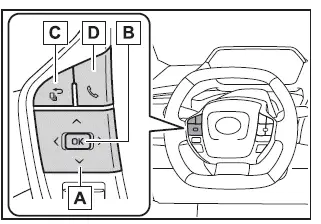
-
 :
Select menu icons, scroll through screens, and move the cursor
:
Select menu icons, scroll through screens, and move the cursor
 :
Change displayed content, scroll screens, and adjust selections
:
Change displayed content, scroll screens, and adjust selections - Press: Enter/Set
Press and hold: Reset or access customizable display options - Return to the previous screen
- Call sending/receiving and call history display
When connected to the hands-free system, call-related information such as incoming, outgoing, or missed calls will be shown directly on the Subaru Solterra display.
For detailed instructions regarding the hands-free system, refer to the multimedia owner's manual.
Content of driving information
■ Power consumption
The values shown in the Subaru Solterra should be used as a reference to help improve driving efficiency and energy management.
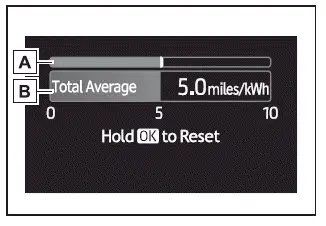
- Current power consumption
Displays real-time energy usage of the Subaru Solterra. - Trip Average/Total Average
To reset the average consumption data, press and hold the corresponding meter control switch.
The average power consumption view can be changed through
 settings.
- Trip Average
Displays average energy consumption since the EV system was last started. - Total Average
Displays long-term average consumption since the last reset of the Subaru Solterra system.
■ Power consumption
In the Subaru Solterra, power consumption is expressed as a numerical value representing energy efficiency, similar to fuel economy in traditional vehicles. It shows how many miles can be traveled per kilowatt-hour (miles/kWh), providing a clear indication of driving efficiency and helping drivers optimize their driving habits for maximum range.
 Gauges and meters
In the Subaru Solterra, the gauges and meters are designed to provide
the driver with clear, real-time driving information, helping to maintain awareness
of vehicle performance, battery condition, ...
 Driving support system information display
■ Driving support system information
In the Subaru Solterra, this section of the multi-information display allows
the driver to monitor the real-time operating status of advanced driving assistan ...
Other materials:
Side Turn Light Inspection
Side turn light illumination inspection
1. Disconnect the negative battery cable..
2. Remove the outer mirror glass..
3. Remove the outer mirror garnish..
4. Remove the side turn light..
5. Connect the battery voltage as shown in the figure.
If the side turn light does illuminat ...
Control Valve Body Removal/Installation [FS5 A EL]
Primary Control Valve Body On-Vehicle Removal
WARNING:
A hot transaxle and ATF can cause severe burns. Turn off the engine and wait
until they are cool.
Using compressed air can cause dirt and other particles to fly out, causing
injury to the eyes. Wear protective eyeglasses w ...
Child Restraint Seat Anchor Removal/Installation
4SD
1. Remove the cover.
2. Remove the bolt and child-restraint seat anchor.
3. Install in the reverse order of removal.
5HB
1. Remove the trunk end trim..
2. Remove the bolt and child-restraint seat anchor.
3. Install in the reverse order of removal. ...
