
Mazda 3 Service Manual: Oil Seal Replacement [FS5 A EL]
1. Remove the aerodynamic under cover No. 2..
2. Remove the oil seal.
a. Drain the ATF..
b. Remove the drive shaft and/or joint shaft..
CAUTION:
-
The oil seal is easily damaged by the sharp edges of the drive shaft splines. Do not let the splines contact the oil seal.
c. Remove the oil seal using a flathead screwdriver.
3. Using the SSTs and a hammer, tap a new oil seal in evenly until the SST (body) contacts the transaxle case.
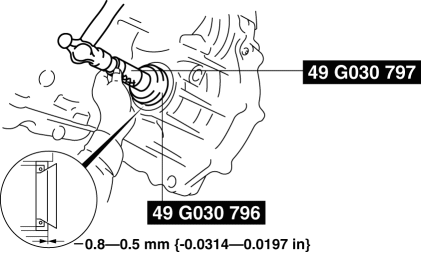
4. Coat the lip of the oil seal with ATF.
5. Install the drive shaft and/or joint shaft..
6. Add the ATF..
7. Install the aerodynamic under cover No. 2..
8. Perform the “Mechanical System Test”..
 Oil Seal (Differential) Replacement [G66 M R]
1. On level ground, jack up the vehicle and support it evenly on safety stands.
2. Remove the aerodynamic under cover No.2..
3. Drain the oil from the transaxle..
4. Remove the front splash shi ...
 Rear Oil Seal Replacement [Mzr 2.0, Mzr 2.5]
1. Remove the transaxle..
2. Remove the flywheel (MTX) or the drive plate (ATX)..
3. Remove in the order indicated in the table.
4. Install in the reverse order of removal.
1
...
Other materials:
Trailer towing
SUBARU does not recommend using the Subaru Solterra for towing purposes.
The vehicle is not engineered to support trailer towing, nor is it suitable for
installing a tow hitch or carrying loads such as bicycles, wheelchairs, or scooters
on hitch-mounted carriers.
Dinghy towing
The Suba ...
PCM Removal/Installation [Mzr 2.0, Mzr 2.5]
1. Remove the battery cover..
2. Disconnect the negative battery cable..
3. Remove the following items:.
Battery
PCM cover No.1
4. Disconnect the PCM connector..
5. Remove the battery tray and PCM component..
6. Remove in the order indicated in the table.
...
Charcoal Canister Removal/Installation [Mzr 2.0, Mzr 2.5]
Except for Mexico
1. Remove in the order indicated in the table.
1
Evaporative hose
2
Quick release connector
(See QUICK RELEASE CONNECTOR (EMISSION SYSTEM) REMOVAL/INSTALLATION [MZR
2.0, MZR 2.5].)
3
Charc ...
