
Mazda 3 Service Manual: Side Step Molding Removal
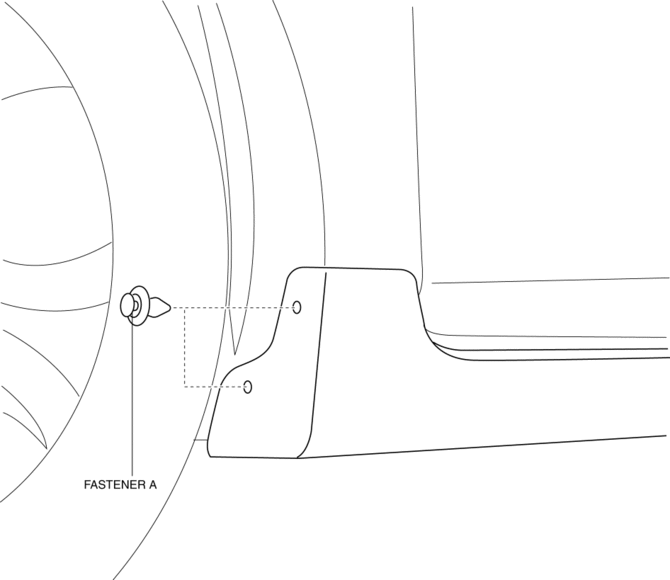
1. Remove the fasteners A.
2. Using the removal tool, disengage clips B in the direction of the arrow (1), (2) shown in the figure.
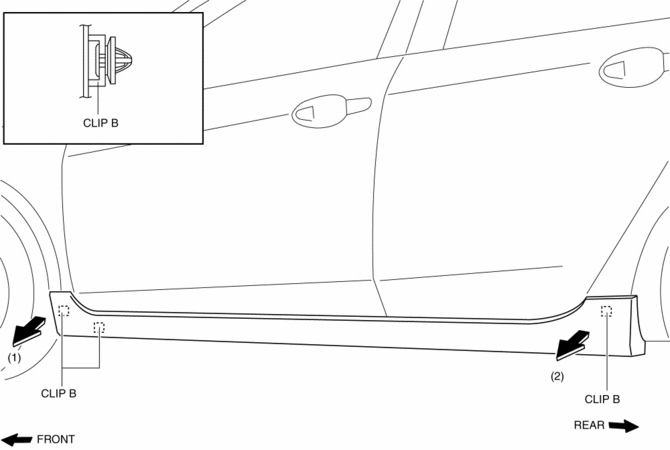
NOTE:
-
Leave the disengaged clip B in place in consideration of the servicing.
3. Slide the side step molding in the direction of the arrow (3) shown in the figure and remove the side step molding from clips C and D.
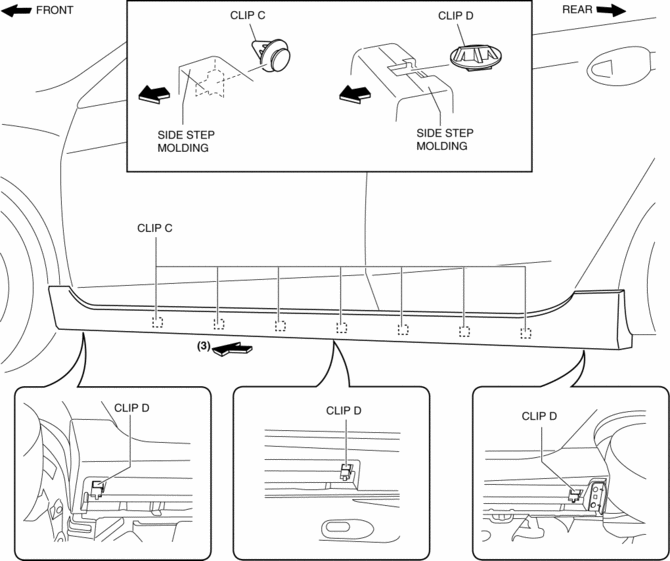
4. After removing the side step molding, remove clips C and D from the body using a fastener remover.
 Side Step Molding Installation
NOTE:
Double-sided adhesive tape has already been adhered to a new side step molding
for installation.
When a side step molding is to be reused, perform the following procedure:
1 ...
 Splash Shield Removal/Installation
Front Splash Shield
1. Remove the bolts and fastener then remove the front splash shield.
2. Install in the reverse order of removal.
Rear Splash Shield
1. Remove the fastener, screws and ca ...
Other materials:
Steering Switch Inspection
Without Bluetooth System
WARNING:
Handling the air bag module improperly can accidentally deploy the air bag
module, which may seriously injure you. Read the air bag system service warnings
and cautions before handling the air bag module..
1. Disconnect the negative battery cabl ...
Operating Tips
Operate the climate control system with
the engine running.
To prevent the battery from being
discharged, do not leave the fan control
dial on for a long period of time with the
ignition switched ON when the engine is
not running.
Clear all obstructions such as leaves,
snow and ic ...
Entertainment System
Outline
Auxiliary jack/USB port has been adopted.
USB adapter has been adopted.
An audio unit which supports USB devices such as USB memory or iPods has
been adopted.
911 assist function has been added to the Bluetooth unit.
RDS-TMC (Radio Data System-Traffi ...
