
Mazda 3 Service Manual: Side Wall Removal/Installation
1. Pull out the side wall in the direction shown in the direction of the arrow shown in the figure, then remove the clips.
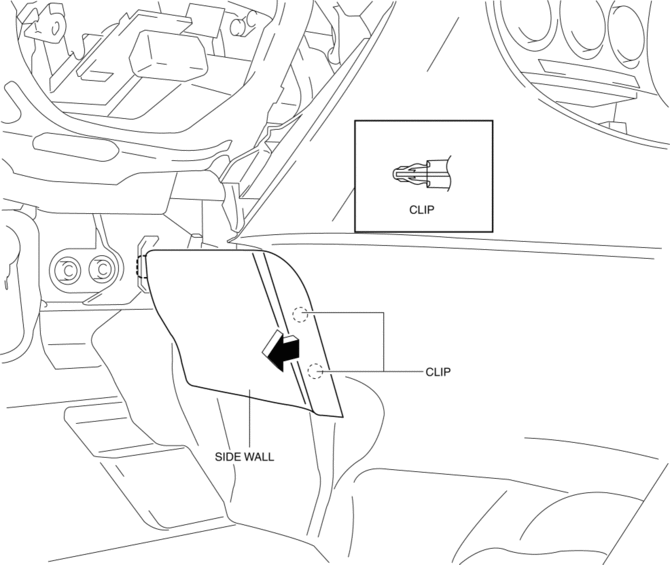
2. Remove the side wall in the direction of the arrow shown in the figure.
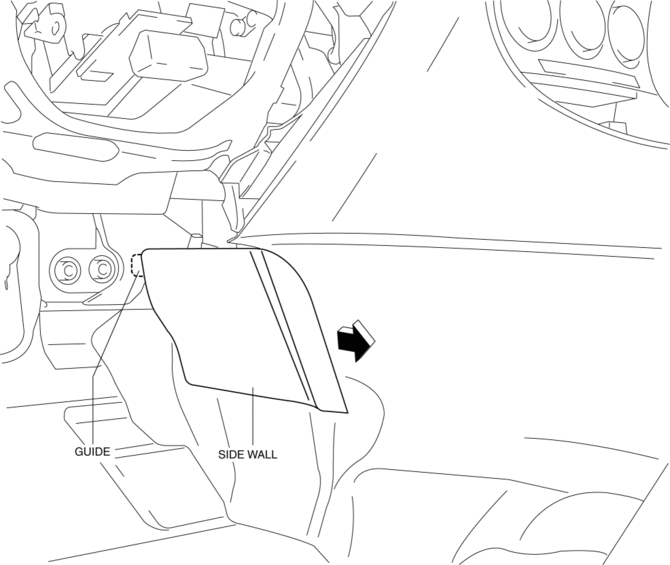
CAUTION:
-
When remove the side wall, be careful not to damage the guide.
3. Install in the reverse order of removal.
 Shift Panel Removal/Installation
ATX
1. Remove the upper panel..
2. Remove the selector lever knob..
3. Pull the shift panel in the direction of the arrow shown in the figure and
remove it while detaching the clips A, hook B a ...
 Trunk Side Upper Trim Removal/Installation
1. Remove the rear seat cushion..
2. Remove the rear scuff plate..
3. Remove the tire house trim..
4. Open the cap.
5. Remove the screw.
6. Remove the fasteners.
7. Pull the trunk side upp ...
Other materials:
Vacuum Hose Removal/Installation [Mzr 2.3 Disi Turbo]
1. Remove the charge air cooler cover..
2. Remove the charge air cooler..
3. Insert a thin flathead screwdriver at the point indicated by the arrow in
the figure, push the ring down and disconnect the vacuum hose from the intake manifold.
4. Remove the vacuum hose from the vacuum hose c ...
Roof Carrier Bracket Removal/Installation
4SD
1. Disconnect the negative battery cable..
2. Remove the following parts:
a. Sunroof seaming welt (vehicles with sunroof)
b. Front scuff plate.
c. Rear scuff plate.
d. A-pillar trim.
e. B-pillar lower trim.
f. Upper anchor of the front seat belt installation bolt.
g. B-pillar up ...
Rear Center Speaker Removal/Installation
1. Disconnect the negative battery cable..
2. Remove the following parts:
a. Rear seat cushion.
b. Rear scuff plate.
c. Tire house trim.
d. C-pillar trim.
e. Rear package trim.
3. Remove the screw.
4. Disconnect the connector.
5. Remove the rear center speaker.
6. Install in ...
