
Mazda 3 Service Manual: Trunk Side Upper Trim Removal/Installation
1. Remove the rear seat cushion..
2. Remove the rear scuff plate..
3. Remove the tire house trim..
4. Open the cap.
5. Remove the screw.
6. Remove the fasteners.
7. Pull the trunk side upper trim in the direction of arrow, then detach the hooks and clips.
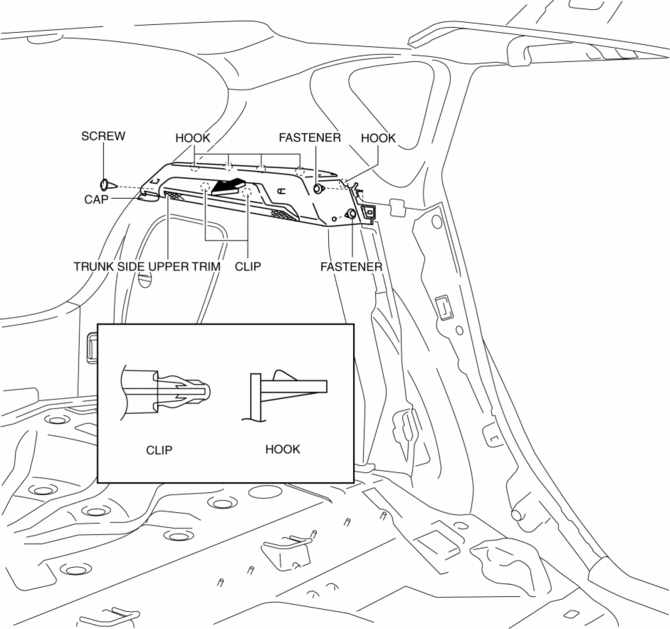
8. Install in the reverse order of removal.
 Side Wall Removal/Installation
1. Pull out the side wall in the direction shown in the direction of the arrow
shown in the figure, then remove the clips.
2. Remove the side wall in the direction of the arrow shown in the fi ...
 Assist Handle Removal/Installation
Assist Handle Removal
1. Insert a flathead screwdriver into the service hole and remove the assist
handle covers.
2. Remove the assist handle in the direction of the arrow (1) and (2), while ...
Other materials:
PCM Inspection [Mzr 2.0, Mzr 2.5]
Using M-MDS
NOTE:
PIDs for the following parts are not available on this model. Go to the appropriate
part inspection page.
CMP sensor
Main relay
1. Connect the M-MDS to the DLC-2.
2. Switch the ignition to ON.
3. Measure the PID value.
...
Generator Removal/Installation [Mzr 2.0, Mzr 2.5]
WARNING:
Remove and install all parts when the engine is cold, otherwise they can
cause severe burns or serious injury.
When the battery cables are connected, touching the vehicle body with generator
terminal B will generate sparks. This can cause personal injury, fire, and ...
Headlight Bulb Removal/Installation
Halogen Type
Low-beam
1. Disconnect the negative battery cable..
2. Disconnect the connector.
3. Remove the cover.
4. Remove the adaptor.
5. Remove the headlight bulb (LO).
CAUTION:
A halogen bulb generates extremely high heat when it is illuminated. If the
surface of ...
