
Mazda 3 Service Manual: Steering Gear And Linkage Inspection
Steering Rack Inspection
1. Inspect for cracking, damage, and tooth wear.
-
If there is any malfunction, replace the steering rack.
2. Measure the steering rack warp.
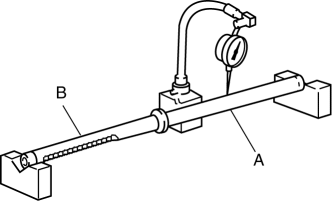
-
If it exceeds the maximum specification, replace the steering rack.
-
Steering rack runout
-
Large diameter portion (near point A): 0.15 mm {0.006 in} max.
-
Small diameter portion (near point B): 0.20 mm {0.008 in} max.
Tie-rod End Inspection
1. Inspect the tie-rod end for damage and the boot for cracks.
-
If there is any malfunction, replace the tie-rod end.
2. Inspect for excessive play.
-
If there is any malfunction, replace the tie-rod end.
3. Rotate the ball joint 5 times
.
4. Install two nuts to the ball joint and measure the tie-rod end rotational torque using a torque wrench.
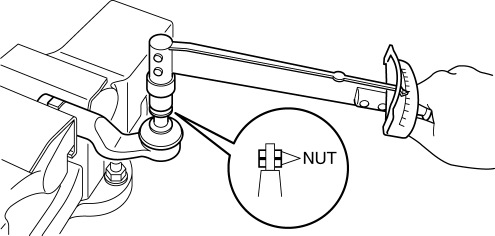
-
If not within the specification, replace the tie-rod end.
-
Tie-rod end rotational torque
-
0.5—3.0 N·m {5.1—30 kgf·cm, 4.5—26 in·lbf}
Tie rod Inspection
1. Inspect for bending and damage.
-
If there is any malfunction, replace the tie rod.
2. Inspect for excessive play.
-
If there is any malfunction, replace the tie rod.
3. Swing the ball joint 10 times
.
4. Measure the ball joint swing torque using a pull scale.
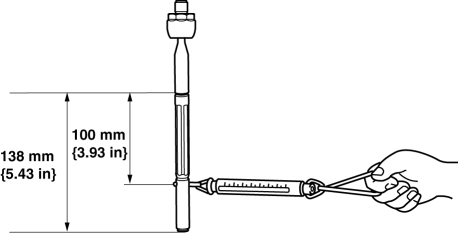
-
If it exceeds the specification, replace the tie rod.
-
Tie rod swing torque
-
0.4—4.0 N·m {4.1—40 kgf·cm, 3.6—35 in·lbf}
-
[Pull scale reading 0.6—29.3 N {0.06—2.98 kgf, 0.14—6.58 lbf}]
 Steering Gear And Linkage Disassembly
CAUTION:
To prevent damage to the steering gear, secure it to the vise using a copper
plate or clean cloth.
1. Disassemble in the order indicated in the table.
1
...
 Steering Gear And Linkage Removal/Installation
CAUTION:
Performing the following procedures without first removing the ABS wheel-speed
sensor may possibly cause an open circuit in the wiring harness if it is pulled
by mistake. Before ...
Other materials:
Steering Shaft Inspection
1. Inspect the column bearing for excessive play and damage.
2. Verify that the measurement of the steering shaft indicated in the figure
is as specified.
If not within the specification replace the steering shaft component.
Steering shaft length
315—320 mm {12.41—1 ...
Windshield Wiper Arm And Blade Adjustment
1. Operate the windshield wipers, and then turn off the windshield wiper motor
to set the wipers in the auto stop position.
2. Slide the serrated connecting part and adjust the windshield wiper arm and
blade so that its end is aligned with the hollowed mark in the ceramic coating.
NOTE: ...
Vacuum Hose Removal/Installation [Skyactiv G 2.0]
1. Remove the plug hole plate..
2. Remove the battery and battery tray..
3. Remove the vacuum hose from the vacuum hose clip.
4. Pinch open the clamp using pliers and disconnect the vacuum hose from the
vacuum pump.
5. Move the vacuum hose as shown in the figure.
6. Disconnect th ...
