
Mazda 3 Owners Manual: Tire Pressure Monitoring System
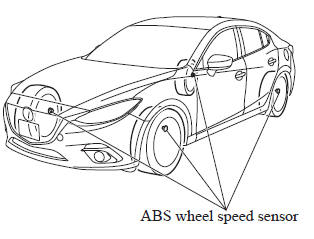
The Tire Pressure Monitoring System (TPMS) monitors the air pressure of all four tires. If the air pressure of one or more tires is too low, the system warns the driver by indicating the tire pressure monitoring system warning light in the instrument cluster and operating a beep sound. The system monitors the tire pressures indirectly using the data sent from the ABS wheel speed sensors.
To allow the system to operate correctly, the system needs to be initialized with the specified tire pressure (value on the tire pressure label). Follow the procedure and perform the initialization.
Refer to Tire Pressure Monitoring System Initialization on .
The warning light flashes when the system has a malfunction.
Refer to Warning Lights on .
CAUTION
|
NOTE Because this system detects slight changes in tire conditions, the timing of the warning may be faster or slower in the following cases:
- The size, manufacturer, or the type of tires is different from the specification.
- The size, manufacturer, or the type of a tire is different from the others, or the level of tire wear is excessively different between them.
- A run-flat tire, studless tire, snow tire, or tire chains are used.
- An emergency tire is used (The tire pressure monitoring system warning light may flash and then continue illuminating).
- A tire is repaired using the emergency flat tire repair kit.
- The tire pressure is excessively higher than the specified pressure, or the tire pressure is suddenly lowered for some reason such as a tire burst during driving.
- The vehicle speed is lower than about 15 km/h (9.3 mph) (including when the vehicle is stopped), or the drive period is shorter than 5 minutes.
- The vehicle is driven on an extremely rough road or a slippery, icy road.
- Hard steering and rapid acceleration/deceleration are repeated such as during aggressive driving on a winding road.
- Load on the vehicle is applied to a tire such as by loading heavy luggage to one side of the vehicle.
- System initialization has not been implemented with the specified tire pressure.
Tire Pressure Monitoring System Initialization
In the following cases, system initialization must be performed so that the system operates normally.
- A tire pressure is adjusted.
- Tire rotation is performed.
- A tire or wheel is replaced.
- The battery is replaced or completely drained.
- The tire pressure monitoring system warning light is illuminated.
Initialization method
- Park the car in a safe place and firmly apply the parking brake.
- Let the tires cool, then adjust the tire
pressure of all four (4) tires to the
specified pressure indicated on the tire
pressure label located on the driver's
door frame (door open).
Refer to Tires on .
- Switch the ignition ON.
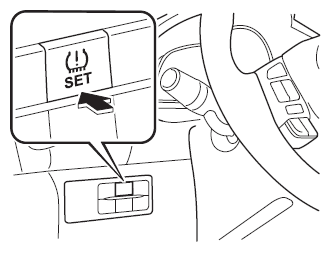
- While the vehicle is parked, press and hold the tire pressure monitoring system set switch and verify that the tire pressure monitoring system warning light in the instrument cluster flashes twice and a beep sound is heard once.
| CAUTION
If the system initialization is performed
without adjusting the tire pressure,
the system cannot detect the normal
tire pressure and it may not illuminate
the tire pressure monitoring system
warning light even if a tire pressure is
low, or it may illuminate the light even
if the pressures are normal. Adjust the tire pressure on all four tires and initialize the system when the warning light is turned on. If the warning light turns on for a reason other than a fl at tire, the tire pressure of all four tires may have decreased naturally. The system initialization will not be performed if the switch is pressed while the vehicle is being driven. |
 Cruise Control
With cruise control, you can set and automatically maintain any speed of more
than about
25 km/h (16 mph).
WARNING
Do not use the cruise control under the following conditions:
Using ...
 Rear View Monitor
The rear view monitor provides visual images of the rear of the vehicle when
reversing.
WARNING
Always drive carefully confi rming the safety of the rear and the
surrounding condition ...
Other materials:
Blower Motor Installation [Full Auto Air Conditioner]
1. Install the SST (49 B061 015A) to the blower motor.
2. Install the blower motor with the SST (49 B061 015A) installed, to
the A/C unit.
CAUTION:
To prevent damage to the sirocco fan, install the blower motor being careful
that the blower motor does not interfere with the ...
Air Cleaner Element Inspection [Mzr 2.0, Mzr 2.5]
1. Remove the air cleaner element..
2. Inspect the following items:
Has the replacement interval come?
Is the air cleaner element soiled, damaged, or bent?
Are the air cleaner case and the air cleaner element correctly sealed?
Is the correct air cleaner element inst ...
Disc Pad (Rear) Replacement
1. Remove in the order indicated in the table.
2. Install in the reverse order of removal.
3. After installation, pump the brake pedal a few times and inspect the following:
Parking brake lever stroke
Brake drag
1
Parking brake cable
(See PAR ...
