
Subaru Solterra 2023-2026 Owner's Manual: Using My Room Mode
In the Subaru Solterra, when the charging cable is connected, selected electrical systems such as the climate control and audio setup can operate using energy supplied directly from an external power source, allowing you to comfortably use the vehicle interior without relying entirely on the traction battery.
Starting My Room Mode
1. Connect the charging cable to the Subaru Solterra to initiate the charging process.
2. While charging is active, switch the power to the ON position.
The My Room Mode interface will automatically appear on the multi-information display of the Subaru Solterra.
3. Use the meter control switches to highlight “Yes”, then confirm by pressing “OK”.
Once activated, My Room Mode in the Subaru Solterra allows operation of systems such as air conditioning, infotainment, and other onboard electronics.
If My Room Mode is not required, select “No” and confirm with “OK”.
To deactivate My Room Mode, simply turn the power switch off.
The system will also automatically exit My Room Mode when DC fast charging is completed.
Display information for electric power balance during My Room Mode
When My Room Mode is launched in the Subaru Solterra, the system automatically presents a real-time electric power balance screen on the multi-information display, allowing the driver to monitor the relationship between supplied and consumed energy.
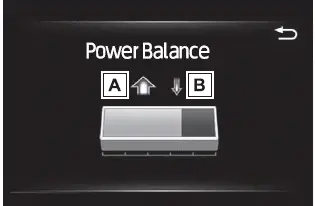
- Discharging (-)
- Charging (+)
The arrow indicators dynamically change in size depending on the level of power input and consumption within the Subaru Solterra.
If power consumption exceeds supply, indicator A becomes more prominent than B.
If both values are balanced, A and B will appear equal in size.
■ Meter display while charging
When the power switch is turned ON during charging, the Subaru Solterra will automatically turn the system off if My Room Mode is not selected within approximately 100 seconds, preventing unnecessary energy use.
■ When using My Room Mode the following may occur
- When the traction battery level drops to its lower threshold, the climate system in the Subaru Solterra will automatically shut down. Operation will only resume once sufficient charge is restored. Turn the power off and restart My Room Mode after recharging.
- The total charging duration of the traction battery may increase due to simultaneous power usage.
- Radio interference or noise may occur depending on external signal conditions.
- The onboard charger area located in the motor compartment may become warm during operation.
- The electric power steering warning indicator (yellow) may illuminate temporarily; this does not indicate a malfunction.
- During normal charging, the Subaru Solterra may regulate charging levels to maintain sufficient reserve for My Room Mode functionality.
■ Using My Room Mode during DC charging
- When My Room Mode is active during DC charging, the final battery charge level may be lower compared to standard charging. In cold or humid environments, window fogging may occur; activating cooling and dehumidification will help maintain cabin clarity. However, this may temporarily pause traction battery temperature control and slightly reduce charging efficiency in the Subaru Solterra.
- Once the battery reaches full capacity, the Subaru Solterra will automatically exit My Room Mode.
■ When "My Room Mode" is used while the traction battery is fully charged
If the Subaru Solterra is fully charged and the charging connector remains attached while the power is switched ON, a message such as “Charging Port Lid is Open” will appear on the display.
In this situation, press
 on the meter control switches to open the My Room Mode settings, then select “My
Room Mode”.
on the meter control switches to open the My Room Mode settings, then select “My
Room Mode”.
Even when fully charged, using My Room Mode in the Subaru Solterra may consume stored battery energy.
If necessary, the system will resume charging automatically.
■ Warning message display
If a notification appears on the multi-information display while activating or using My Room Mode in the Subaru Solterra, follow the indicated instructions to resolve the issue appropriately.
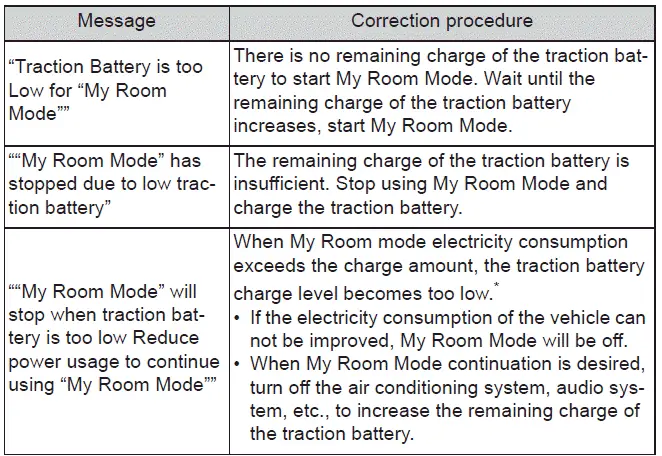
*: While My Room Mode is active, the electric power balance can always be monitored via the multi-information display of the Subaru Solterra.
WARNING
■ Warnings for using My Room Mode
Always follow these safety precautions carefully.
Failure to comply may lead to serious injury, health risks, or fatal consequences.
- Never leave children, vulnerable individuals, or pets unattended inside the Subaru Solterra. Cabin temperature may fluctuate due to automatic system behavior, potentially causing heatstroke, dehydration, or hypothermia. Additionally, unintended operation of vehicle controls may result in accidents.
- Before activating My Room Mode in the Subaru Solterra, thoroughly check the surrounding area to ensure a safe environment.
 Using the charging schedule function
The Subaru Solterra allows AC charging to be conveniently scheduled
in advance, enabling drivers to optimize charging times according to their daily
routine and energy cost preferences.
■ Calen ...
 When charging cannot be carried out
If charging of the Subaru Solterra does not begin even after correctly
following the standard procedure, carefully review each of the following checks.
If any notification appears on the multi-inf ...
Other materials:
Floor Covering Removal/Installation
1. Disconnect the negative battery cable..
2. Remove the following parts:
a. Front seat.
b. Audio amplifier (Vehicles with Bose®).
c. Front scuff plate.
d. Joint cover.
e. Front side trim.
f. Fuel-filler lid opener lever bezel.
g. Selector lever knob (ATX).
h. Shift lever knob (MT ...
Direct Mode
Direct mode can be used for temporarily
switching gears by operating the steering
shift switch while the vehicle is being
driven with the selector lever in the D
range.
While in direct mode, the D and M
indication illuminate and the gear position
in use is illuminated.
Direct mode is can ...
Washer Motor Removal/Installation
4SD
1. Disconnect the negative battery cable..
2. Remove the front mudguard (RH)..
3. Remove in the order indicated in the table.
1
Windshield washer hose
2
Washer motor connector
3
Washer motor
...
