
Mazda 3 Service Manual: Vacuum Hose Removal/Installation [Skyactiv G 2.0]
1. Remove the plug hole plate..
2. Remove the battery and battery tray..
3. Remove the vacuum hose from the vacuum hose clip.
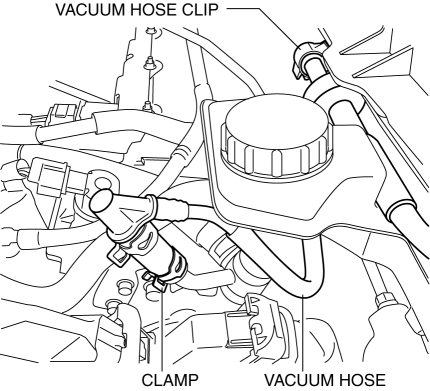
4. Pinch open the clamp using pliers and disconnect the vacuum hose from the vacuum pump.
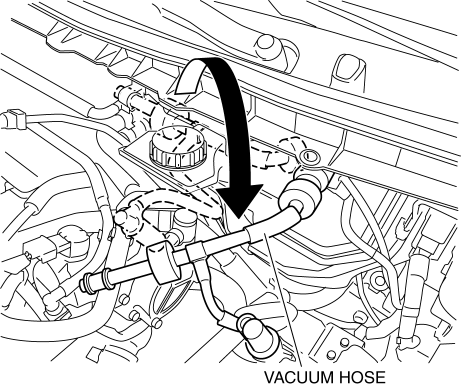
5. Move the vacuum hose as shown in the figure.
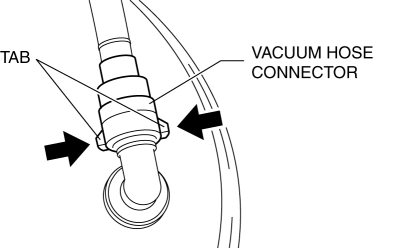
6. Disconnect the vacuum hose connector from the power brake unit while pressing the tabs of the vacuum hose connector.
7. Remove the vacuum hose.
8. Install in the reverse order of removal.
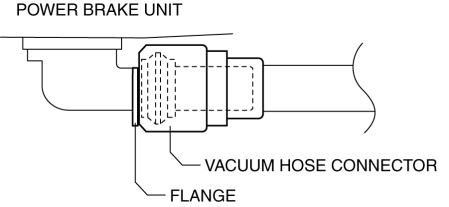
9. Insert the vacuum hose connector to the power brake unit.
10. Verify that the vacuum hose is inserted so that the connector contacts the power brake unit flange.
 Vacuum Hose Removal/Installation [Mzr 2.3 Disi Turbo]
1. Remove the charge air cooler cover..
2. Remove the charge air cooler..
3. Insert a thin flathead screwdriver at the point indicated by the arrow in
the figure, push the ring down and disconne ...
 Vacuum Line Inspection
MZR 2.0, MZR 2.5, MZR 2.3 DISI Turbo
1. Remove the vacuum hose..
2. Verify that air can be blown from the power brake unit side of the vacuum
hose towards the intake manifold side, and that air c ...
Other materials:
Air conditioning filter
To ensure optimal performance of the climate control system in your
Subaru Solterra, the air conditioning filter must be inspected and replaced at regular
intervals.
A clean air conditioning filter in the Subaru Solterra not only improves
airflow efficiency but also enhances cabin air quality ...
Discharge Headlight System Inspection
Discharge headlight inoperative
WARNING:
Incorrect servicing of the discharge headlight bulb could result in electrical
shock. Before servicing the discharge headlight bulb, always refer to the service
warnings..
Terminal layout
Inspection procedure
ST ...
Air Bleeding
CAUTION:
If the strainer is removed, impurities may penetrate the power steering system
and damage it. To prevent this, always bleed air with the strainer installed.
Do not maintain the steering wheel fully turned for 5 s or more. The oil
temperature could rise and damage ...
