
Mazda 3 Service Manual: Transaxle Oil Replacement [A26 M R]
1. Park the vehicle on level ground.
2. Remove the aerodynamic under cover No.2..
3. Remove the drain plug and gasket.
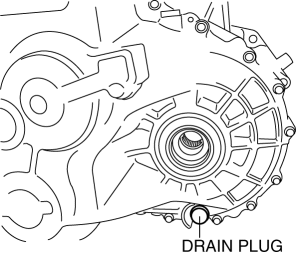
4. Drain the oil into a suitable container.
5. Install a new gasket and the drain plug.
-
Tightening torque
-
28—51 N·m {2.9—5.2 kgf·m, 21—37 ft·lbf}
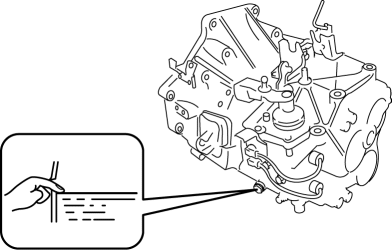
6. Remove the oil level plug and gasket.
7. Add the specified amount and type of oil through the oil level plug hole until the level reaches the bottom of the oil level plug hole.
Manual transaxle oil
|
Item |
Specification |
|
Grade |
API service GL-4 |
|
Viscosity |
SAE 75W-80 |
|
Capacity (approx. quantity) |
2.4—2.6 L {2.6—2.7 US qt, 2.12—2.28 lmp qt} |
8. Install a new gasket and the oil level plug.
-
Tightening torque
-
28—51 N·m {2.9—5.2 kgf·m, 21—37 ft·lbf}
9. Install the aerodynamic under cover No.2..
 Transaxle Oil Inspection [G66 M R]
1. Park the vehicle on level ground.
2. Remove the aerodynamic under cover No.2..
3. Remove the oil level plug and washer.
4. Verify that the oil is near the brim of the plug port.
I ...
 Transaxle Oil Replacement [G35 M R]
1. Park the vehicle on level ground.
2. Remove the aerodynamic under cover No.2..
3. Remove the drain plug and washer.
4. Drain the oil into a suitable container.
5. Install a new washer a ...
Other materials:
Oil Seal (Differential) Replacement [C66 M R]
1. Remove the aerodynamic under cover No.2 and the splash shield as a single
unit..
2. Drain the manual transaxle oil..
3. Disconnect the drive shaft (LH) from the MTX..
4. Disconnect the drive shaft (RH) from the joint shaft..
5. Remove the joint shaft..
6. Remove the oil seal (LH).
...
Front Fog Light Removal/Installation
Except Mazdaspeed3
1. Disconnect the negative battery cable..
2. Remove the front bumper..
3. Pull the wiring harness from the hook in the direction of the arrow shown
in the figure and remove it.
4. Disconnect the connector.
5. Pull the wiring harness in the direction of the arrow (2 ...
No.7 Bsm Indicator Light Does Not Flash While Under Bsm Indicator Light Flashing
Conditions (With Combination Switch Operation (Turn Signal Switch)) [Blind Spot
Monitoring (Bsm)]
7
BSM indicator light does not flash while under BSM indicator light-flashing
conditions (with combination switch operation (turn signal switch))
Description
The BSM indicator light does not flash or illuminate continuously,
...
