
Mazda 3 Service Manual: Variable Tumble Shutter Valve Actuator Inspection [Mzr 2.0, Mzr 2.5]
Operation Inspection
1. Remove the air hose..
2. Disconnect the vacuum hose from the variable tumble shutter valve actuator.
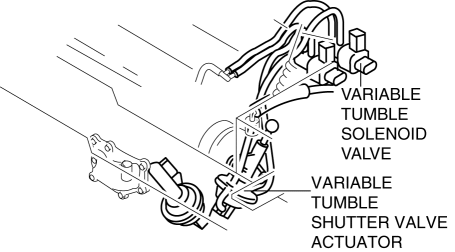
3. Connect a vacuum pump to the variable tumble shutter valve actuator.
NOTE:
-
Covered with a hood, the rod of the variable tumble shutter valve actuator cannot be seen from above. Use a mirror from under it to check the operation of the variable tumble shutter valve.
4. Check if the rod operates correctly as stated in the table when a gradual negative pressure is applied to the variable tumble shutter valve actuator.
|
Vacuum kPa {mmHg, inHg} |
Rod movement |
|
Below –2.7 {–20, –0.8} |
No operate |
|
Above –33.4 {–251, –9.86} |
Fully pulled |
-
When it is not possible to confirm it, replace the intake manifold..
-
When the variable tumble shutter valve actuator cannot be activated even though the operation of the rod can be confirmed, check for any incorrect connections or breakage of the vacuum hose.
 Variable Swirl Solenoid Valve Inspection [Mzr 2.3 Disi Turbo]
Airflow Inspection
1. Remove the battery cover..
2. Disconnect the negative battery cable..
3. Remove the variable swirl solenoid valve..
4. Inspect the airflow between the ports under the foll ...
 Variable Tumble Solenoid Valve Inspection [Mzr 2.0, Mzr 2.5]
Airflow Inspection
1. Remove the battery cover..
2. Disconnect the negative battery cable..
3. Remove the variable tumble solenoid valve..
4. Inspect airflow between the ports under the followi ...
Other materials:
Child restraint system fixed with a child restraint LATCH anchor
■ Child restraint LATCH anchors
The Subaru Solterra is equipped with dedicated LATCH anchors located in the outboard
positions of the rear seats. These anchors provide a secure and convenient method
for installing compatible child restraint systems without relying solely on seat
belts.
...
Liftgate Latch Switch Inspection
1. Disconnect the negative battery cable..
2. Remove the following parts:
a. Liftgate upper trim.
b. Liftgate side trim.
c. Liftgate lower trim.
d. Liftgate latch and lock actuator.
3. Press the latch in using a flathead screwdriver to inspect the latch lever
condition.
4. Verify ...
On Board Diagnostic System PID/Data Monitor Inspection [FS5 A EL]
NOTE:
The PID data screen function is used for monitoring the calculated value
of input/output signals in the module. Therefore, if the monitored value of
the output parts is not within the specification, it is necessary to inspect
the monitored value of input parts corresponding to ...
