
Mazda 3 Service Manual: Afs (Adaptive Front Lighting System) Control Module Removal/Installation
NOTE:
-
Perform the auto leveling system initialization after newly replacing the AFS control module to assure that the auto leveling system operates correctly.
1. Disconnect the negative battery cable..
2. Remove the following parts:
a. Passenger-side front scuff plate.
b. Passenger-side front side trim.
c. Dashboard under cover.
d. Glove compartment.
e. Passenger-side lower panel.
3. Remove in the order indicated in the table.
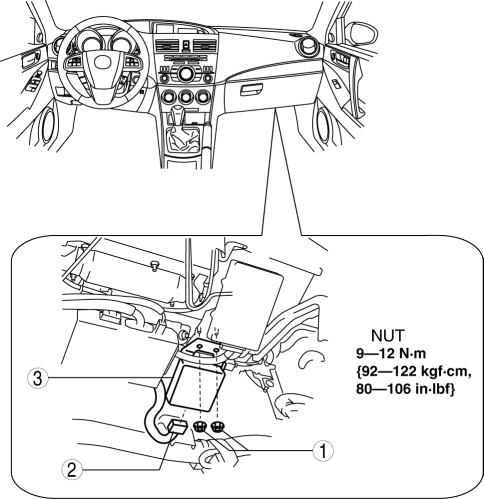
|
1 |
Nut |
|
2 |
Connector |
|
3 |
AFS control module |
4. Install in the reverse order of removal.
5. Perform the headlight auto leveling system initialization after newly replacing the AFS control module..
 Exterior
...
 Afs (Adaptive Front Lighting System) Off Switch Inspection
1. Disconnect the negative battery cable..
2. Remove the AFS OFF switch..
3. Verify that the continuity between the AFS OFF switch terminals is as indicated
in the table.
If the cont ...
Other materials:
Jacking Positions, Vehicle Lift (2 Supports) And Safety Stand (Rigid Rack) Positions
Jacking Positions
WARNING:
Improperly jacking a vehicle is dangerous. The vehicle can slip off the jack
and cause serious injury. Use only the correct front and rear jacking points
and block the wheels.
Use safety stands to support the vehicle after it has been lifted.
...
Back Up Light Switch Removal/Installation [C66 M R]
1. Remove the battery cover..
2. Disconnect the negative battery cable..
3. Remove the aerodynamic under cover No.2..
4. Remove in the order indicated in the table.
5. Install in the reverse order of removal.
1
Back-up light switch connector
2
...
Heated Oxygen Sensor (HO2 S) Inspection [Mzr 2.0, Mzr 2.5]
HO2S Inspection
1. Connect the M-MDS to the DLC-2.
2. Switch the ignition to ON.
3. Warm up the engine to normal operating temperature.
4. Access the following PIDs using the M-MDS..
VSS (Vehicle speed)
RPM (Engine speed)
O2S12 (HO2S output voltage)
5. Drive ...
