
Mazda 3 Service Manual: Back Up Light Switch Removal/Installation [G35 M R]
1. Remove the battery cover..
2. Disconnect the negative battery cable.
3. Remove the battery component. (ex: battery, battery tray and PCM component).
4. Remove the aerodynamic under cover No.2..
5. Drain the oil from the transaxle..
6. Disconnect the back-up light switch connector and remove the back-up light switch.
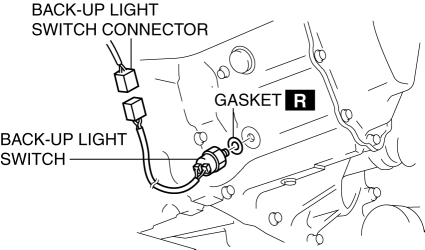
7. Install the back-up light switch (with a new gasket) to the transaxle case.
-
Tightening torque
-
20—29 N·m {2.1—2.9 kgf·m, 15—21 ft·lbf}
8. Install the battery component. (ex: battery, battery tray and PCM component)(See BATTERY REMOVAL/INSTALLATION [MZR 2.0, MZR 2.5].)
9. Install the battery cover..
10. Add the specified amount and type of oil..
11. Install the aerodynamic under cover No.2..
 Back Up Light Switch Removal/Installation [C66 M R]
1. Remove the battery cover..
2. Disconnect the negative battery cable..
3. Remove the aerodynamic under cover No.2..
4. Remove in the order indicated in the table.
5. Install in the reverse o ...
 Back Up Light Switch Removal/Installation [G66 M R]
1. Remove the battery cover..
2. Disconnect the negative battery cable.
3. Remove the battery component. (ex: battery, battery tray and PCM component).
4. Remove the aerodynamic under cover No. ...
Other materials:
Variable Swirl Shutter Valve Actuator Inspection [Mzr 2.3 Disi Turbo]
Operation Inspection
1. Remove the air hose..
2. Disconnect the vacuum hose from the variable swirl control solenoid valve.
3. Connect a vacuum pump to the variable swirl shutter valve actuator.
4. Apply vacuum and verify that the rod moves.
Vacuum
kPa {mmHg, inHg ...
Back Up Light Switch Removal/Installation [A26 M R]
1. Disconnect the negative battery cable.
2. Disconnect the back-up light switch connector.
3. Remove the aerodynamic under cover No.2..
4. Remove the back-up light switch with the gasket.
5. Install a new gasket and the back-up light switch to the transaxle case.
Tightening torque ...
Vanity Mirror Illumination Inspection
1. Disconnect the negative battery cable..
2. Remove the sunvisor..
3. Verify that the continuity between the vanity mirror illumination terminals
is as indicated in the table.
If not as indicated in the table, inspect the bulb. If there is no malfunction,
replace the sunvisor.
...
