
Mazda 3 Service Manual: Before Service Precaution [Mzr 2.0, Mzr 2.5]
WARNING:
-
Fuel vapor is hazardous. It can very easily ignite, causing serious injury and damage. Always keep sparks and flames away from fuel.
-
Fuel line spills and leakage from the pressurized fuel system are dangerous. Fuel can ignite and cause serious injury or death and damage. Fuel can also irritate skin and eyes. To prevent this, always complete the “Fuel Line Safety Procedure”.
-
A person charged with static electricity could cause a fire or explosion, resulting in death or serious injury. Before performing work on the fuel system, discharge static electricity by touching the vehicle body.
Fuel Line Safety Procedure
1. Remove the battery cover..
2. Disconnect the negative battery cable..
3. Remove the fuel-filler cap to release the pressure inside the fuel tank.
4. Remove the fuel pump relay.
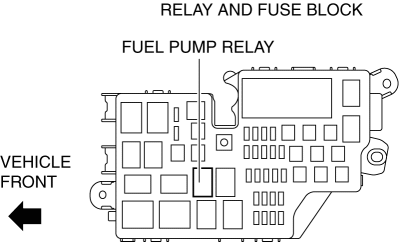
5. Connect the negative battery cable..
6. Start the engine.
7. After the engine stalls, crank the engine 2—3 times.
8. Switch the ignition to off.
9. Disconnect the negative battery cable..
10. Install the fuel pump relay.
 After Service Precaution [Mzr 2.0, Mzr 2.5]
WARNING:
Fuel line spills and leakage are dangerous. Fuel can ignite and cause serious
injuries or death and damage. When installing the fuel hose, perform “Fuel Leakage
Inspection” ...
 Fuel Filler Cap Inspection [Mzr 2.0, Mzr 2.5]
Leakage Inspection
1. Perform the following SST (Evaporative Emission System Tester 134-01049A)
self-test:
NOTE:
If the tester does not work correctly during self-test, refer to the teste ...
Other materials:
Air Bag Module And Pre Tensioner Seat Belt Deployment Procedures [Two Step Deployment
Control System]
WARNING:
A live (undeployed) air bag module or pre-tensioner seat belt may accidentally
operate (deploy) when it is disposed of and cause serious injury. Do not dispose
of a live (undeployed) air bag module and pre-tensioner seat belt. If the SSTs
(Deployment tool and Adapter harnes ...
Safety Practices
The way you drive has a great deal to do with your tire mileage and safety.
So cultivate good
driving habits for your own benefit.
Observe posted speed limits and drive at speeds that are safe for
the existing weather
conditions
Avoid fast starts, stops and turns
Avoid potholes and o ...
Battery Removal/Installation [Mzr 2.0, Mzr 2.5]
1. Remove in the order indicated in the table.
2. Install in the reverse order of removal.
1
Battery cover
(See Battery Cover Removal Note.)
(See Battery Cover Installation Note.)
2
Negative battery cable
3
...
