
Mazda 3 Service Manual: Center Cover Removal/Installation
1. Disconnect the negative battery cable..
2. Remove the center panel..
3. Remove the upper clumn cover..
4. Remove the instrument cluster..
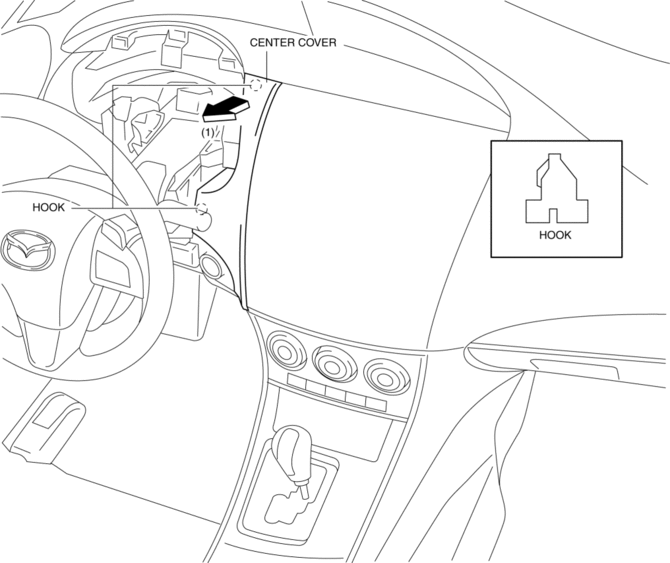
5. Pull the center cover in the direction of arrow (1) shown in the figure, then remove the hooks.
6. Pull the center cover in the direction of arrow (2) shown in the figure, then remove the hook.
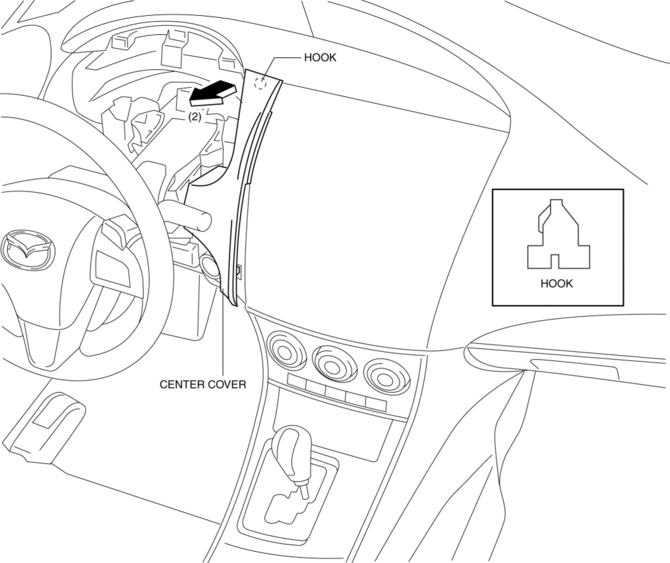
7. Remove the center cover.
8. Install in the reverse order of removal.
 C Pillar Trim Removal/Installation
4SD
1. Remove the following parts:
a. Rear seat cushion.
b. Rear scuff plate.
c. Tire house trim.
2. Partially peel back the seaming welt.
3. Pull the C-pillar trim in the direction of the ...
 Center Panel Removal/Installation
1. Disconnect the negative battery cable..
2. Affix protective tape to the position shown in the figure.
3. Hold parts (A) shown in the figure with your hands and pull the lower edge
of the ...
Other materials:
Rear Power Window Regulator Removal/Installation
1. Fully lower the rear door glass.
2. Disconnect the negative battery cable..
3. Remove the rear door trim..
4. Remove the service hole cover.
5. Remove the rear door speaker..
6. Remove the glass guide..
7. Remove the rear power window motor..
8. Remove the rear door glass..
9. ...
Afs (Adaptive Front Lighting System) Off Switch Inspection
1. Disconnect the negative battery cable..
2. Remove the AFS OFF switch..
3. Verify that the continuity between the AFS OFF switch terminals is as indicated
in the table.
If the continuity is not as indicated in the table, replace the AFS OFF switch.
4. Apply battery po ...
Front Seat Removal/Installation
WARNING:
Handling a front seat (with built-in side air bag) improperly can accidentally
operate (deploy) the air bag, which may seriously injure you. Read the service
warnings before handling a front seat (with built-in side air bag)..
CAUTION:
After removing a front seat ...
