
Mazda 3 Service Manual: Front ABS Wheel Speed Sensor Inspection
Sensor Output Value Inspection
CAUTION:
-
Resistance inspection using other testers may cause damage to the ABS wheel-speed sensor internal circuit. Be sure to use the M-MDS to inspect the ABS wheel-speed sensor.
1. Switch the ignition to off.
2. Connect the M-MDS to the DLC-2.
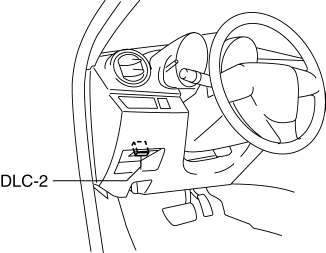
3. Select the following PIDs using the M-MDS:
-
WSPD_LF
(LF wheel-speed sensor)
-
WSPD_RF
(RF wheel-speed sensor)
4. Start the engine and drive the vehicle.
5. Verify that the display of the M-MDS shows the same value as the speedometer.
-
If there is any malfunction, replace the front ABS wheel-speed sensor.
Installation Visual Inspection
1. Inspect for the following:
-
If there is any malfunction, replace the part.
a. Excessive play of the front ABS wheel-speed sensor
b. Deformation of the front ABS wheel-speed sensor
Clearance Inspection
Preparation prior to inspection
1. Remove the front ABS wheel-speed sensor..
2. Remove the wheel hub, steering knuckle component..
3. Install the front ABS wheel-speed sensor to the removed the wheel hub, steering knuckle component, and tighten to the specified torque.
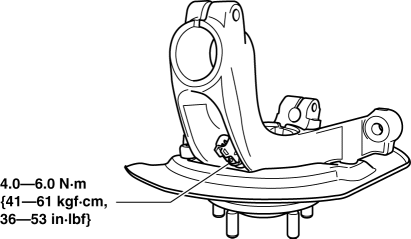
-
Tightening torque
-
4.0—6.0 N·m {41—61 kgf·cm, 36—53 in·lbf}
Clearance Inspection
1. Measure the gap between the front ABS sensor rotor and the front ABS wheel-speed sensor using a feeler gauge.
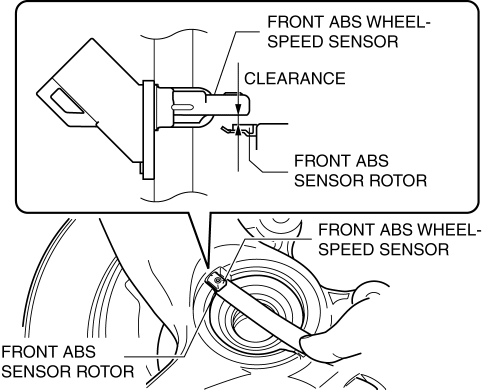
-
If not within the specification, verify the following items and repair or replace if necessary.
-
Is there deformation or damage to the front ABS sensor rotor?
-
Is there deformation or damage to the front ABS wheel speed sensor?
-
Is there foreign material adhering?
-
Clearance
-
2.1 mm {0.082 in} or less
Servicing after inspection
1. Remove the front ABS wheel-speed sensor from the wheel hub, steering knuckle component.
2. Install the wheel hub, steering knuckle component..
3. Install the front ABS wheel-speed sensor..
4. Inspect the front wheel alignment..
 ABS HU/CM Removal/Installation
WARNING:
If the ABS HU/CM configuration is not completed, it could result in an unexpected
accident due to the ABS being inoperative. If the ABS HU/CM or ABS CM is replaced,
always use t ...
 Front ABS Wheel Speed Sensor Removal/Installation
1. Remove in the order indicated in the table.
2. Install in the reverse order of removal.
3. After installation, verify that there is no twisting in the front ABS wheel-speed
sensor.
...
Other materials:
Antenna Feeder No.6 Inspection
1. Disconnect the negative battery cable..
2. Remove the following parts:
a. Upper panel.
b. Shift knob (MTX).
c. Selector lever knob (ATX).
d. Shift panel.
e. Side wall.
f. Console.
g. Car-navigation unit.
3. Verify that the continuity between antenna feeder No.6 terminals is as i ...
No.16 Judder Upon Torque Converter Clutch (TCC) Operation [FS5 A EL]
16
Judder upon torque converter clutch (TCC) operation
DESCRIPTION
Vehicle jolts when TCC is engaged.
POSSIBLE CAUSE
Poor TCC engagement due to either slippage because the TCC is stuck
...
Constant Monitoring
The following components of the air bag systems are monitored by a diagnostic
system:
Crash sensors, and diagnostic module (SAS unit)
Front air bag sensors
Air bag modules
Side crash sensors
Air bag/Front seat belt pretensioner system warning light
Front seat belt pretensioners
Rel ...
