
Mazda 3 Service Manual: Front ABS Wheel Speed Sensor Removal/Installation
1. Remove in the order indicated in the table.
2. Install in the reverse order of removal.
3. After installation, verify that there is no twisting in the front ABS wheel-speed sensor.
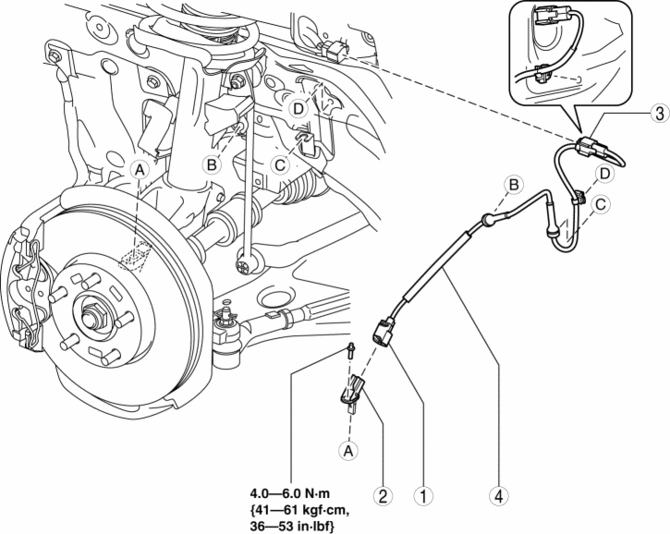
|
1 |
Connector |
|
2 |
Front ABS wheel-speed sensor |
|
3 |
Connector (See Connector Removal Note.) |
|
4 |
Front ABS wheel-speed sensor wiring harness |
Connector Removal Note
1. Pull aside the mudguard and disconnect the connector.
 Front ABS Wheel Speed Sensor Inspection
Sensor Output Value Inspection
CAUTION:
Resistance inspection using other testers may cause damage to the ABS wheel-speed
sensor internal circuit. Be sure to use the M-MDS to inspect the A ...
 Precaution [ABS]
1. Any one or a combination of the ABS warning and brake system warning lights
illuminates even when the system is normal.
Warning lights that may illuminate and/or flash
...
Other materials:
Input/Turbine Speed Sensor Inspection [FS5 A EL]
CAUTION:
Water or foreign objects entering the connector can cause a poor connection
or corrosion. Be sure not to drop water or foreign objects on the connector
when disconnecting it.
On-Vehicle Inspection
1. Perform the following procedures.
a. Remove the battery cover..
b. ...
Quick Release Connector (Emission System) Removal/Installation [Mzr 2.0, Mzr
2.5]
Quick Release Connector Type
CAUTION:
Verify the type and location, and install/remove properly.
Except for Mexico
Mexico
Type A Removal
CAUTION:
Be careful not to damage the evaporative pipe when unlocking the retainer.
NOTE:
When removing the quick r ...
Making a Call
Phonebook Usage
Telephone calls can be made by saying
the name of a person (voice tag) whose
phone number has been registered in
Bluetooth ® Hands-Free in advance. Refer
to Phonebook registration.
Press the pick-up button or talk button
with a short press.
Say: [Beep] “Call”
Prom ...
