
Mazda 3 Service Manual: Front Combination Light Bracket Replacement
NOTE:
-
Verify that the front combination light is not damaged before using the repair bracket for installation when the original brackets are damaged. If the front combination light component is damaged, replace the light as a single unit.
1. Cut off the front combination light bracket at the locations shown in the figure.
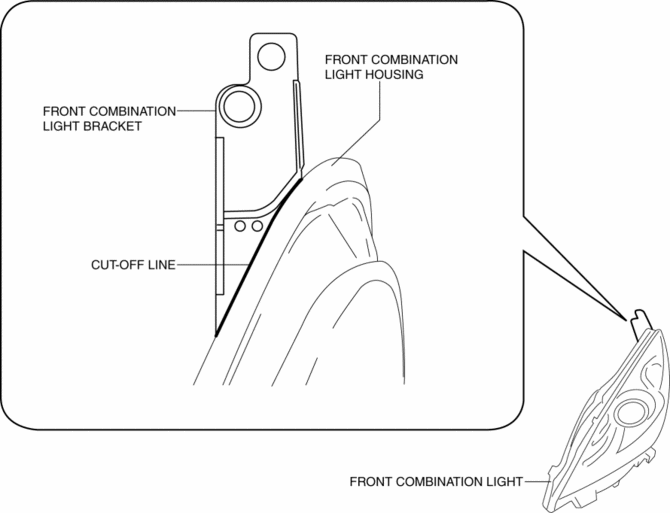
2. Smoothen the cut surfaces using sandpaper so that the repair bracket can be properly installed.
3. Cut the projection at the position shown in the figure.
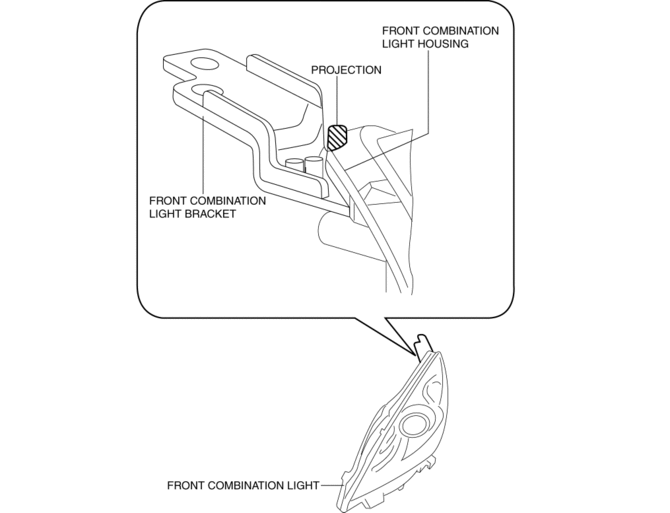
4. After disconnecting the projection, verify that the projection is less than 1mm {0.04 in} from the front combination light housing.
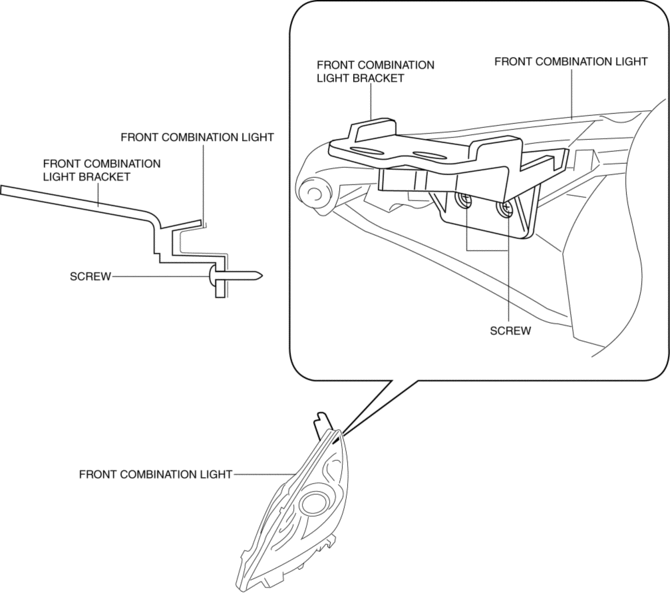
5. Securely attach the repair bracket to the front combination light using the screws.
 Discharge Headlight System Inspection
Discharge headlight inoperative
WARNING:
Incorrect servicing of the discharge headlight bulb could result in electrical
shock. Before servicing the discharge headlight bulb, always refer t ...
 Front Combination Light Removal/Installation
WARNING:
Incorrect servicing of the discharge headlights could result in electrical
shock. Before servicing the discharge headlights, always refer to the discharge
headlight service warn ...
Other materials:
Check Valve Inspection [Skyactiv G 2.0]
Airflow Inspection
1. Remove the vacuum hose..
2. Blow air into the vacuum hose using your mouth from the vacuum pump side and
verify that the air flows to the intake manifold side, then blow air from the intake
manifold side and verify that the air does not flow to the vacuum pump side.
...
Clutch Pedal Position Switch Removal/Installation [C66 M R]
1. Remove the battery cover..
2. Disconnect the negative battery cable..
3. Disconnect the clutch pedal position switch connector.
4. Remove the clutch pedal position switch from the pedal bracket.
5. Insert a new clutch pedal position switch into the pedal bracket hole until
the switc ...
Commander switch operation
NOTE
For safety reasons, some operations are disabled while the vehicle is being
driven.
Volume dial operation
Press the volume dial to switch the audio MUTE on and off.
Turn the volume dial to adjust the volume. The volume increases by turning the
dial
clockwise, and decreases by tur ...
