
Mazda 3 Service Manual: Inner Garnish Removal/Installation
1. Disconnect the negative battery cable..
2. Pull the inner garnish in the direction of the arrow shown in the figure and remove it while detaching clips and tab.
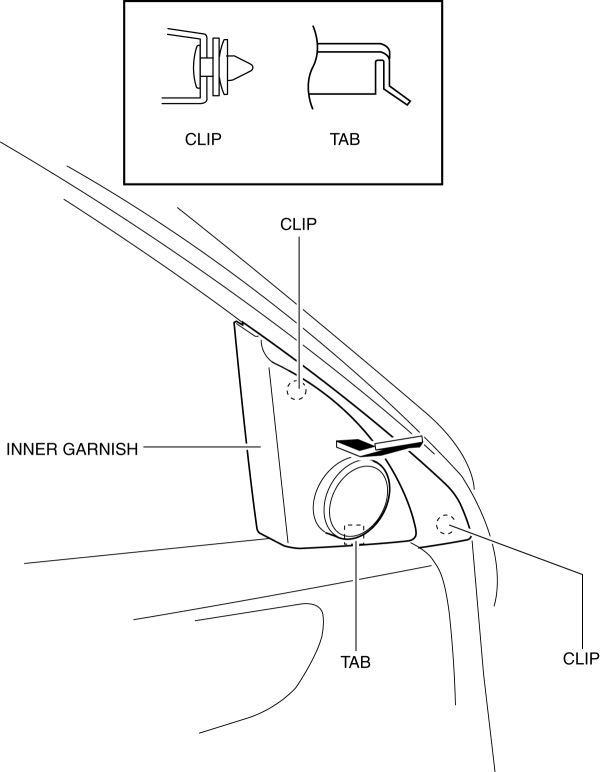
CAUTION:
-
When pulling out the inner garnish, be careful not to damage the tab.
3. Disconnect the front tweeter connector. (Vehicles with tweeter)
4. Install in the reverse order of removal.
 Hole Cover Removal/Installation
With Car-navigation system
1. Disconnect the negative battery cable..
2. Remove the following parts:
a. Upper column cover.
b. Instrument cluster.
c. Center panel.
d. Center cover.
e. Das ...
 Lower Panel Removal/Installation
Driver-side
1. Disconnect the negative battery cable..
2. Remove the following parts:
a. Driver-side front scuff plate.
b. Driver-side front side trim.
c. Hood release lever.
d. Upper panel ...
Other materials:
Hazard Warning Switch Inspection
1. Disconnect the negative battery cable..
2. Remove the center panel..
3. Verify that the continuity between the hazard switch terminals is as indicated
in the table.
If not as indicated in the table, replace the hazard warning switch.
4. Apply battery voltage to hazar ...
Oil Control Valve (OCV) Inspection [Skyactiv G 2.0]
Coil Resistance Inspection
1. Remove the battery cover..
2. Disconnect the negative battery cable..
3. Remove the plug hole plate..
4. Disconnect the OCV connector.
5. Measure the resistance between terminals A and B using an ohmmeter.
OCV coil resistance
6.9—7.5 ohms [20°C ...
PCM Configuration [Mzr 2.0, Mzr 2.5]
CAUTION:
If the wheel and tire sizes are changed, a discrepancy with the speedometer
needle whereby it exceeds the allowable range could result in a malfunction.
If the wheel and tire sizes are changed, perform the following procedure to
change the tire size parameter setting..
...
