
Mazda 3 Service Manual: Lower Panel Removal/Installation
Driver-side
1. Disconnect the negative battery cable..
2. Remove the following parts:
a. Driver-side front scuff plate.
b. Driver-side front side trim.
c. Hood release lever.
d. Upper panel.
e. Shift knob (MTX).
f. Selector lever knob (ATX).
g. Shift panel.
h. Side wall.
i. Console.
3. Partially peel back the seaming welt.
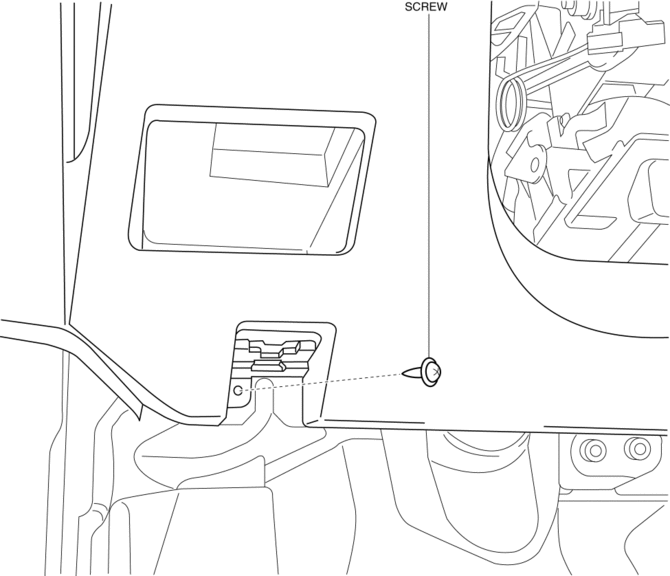
4. Remove the screw.
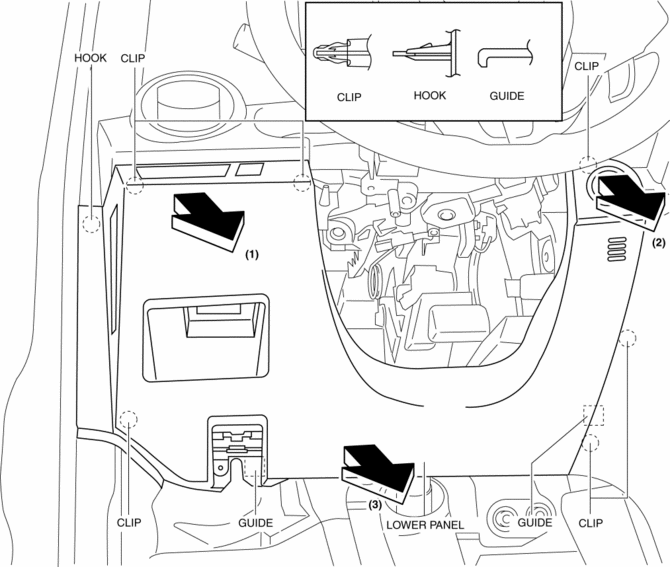
5. Pull the lower panel in the direction of the arrow in the order of (1) (2), (3) and remove the lower panel while detaching the hooks, clips and guides.
6. Disconnect the switch connector.
7. Disconnect the push button start connector.
8. Install in the reverse order of removal.
Passenger-side
1. Remove the following parts:
a. Passenger-side front scuff plate.
b. Passenger-side front side trim.
c. Dashboard under cover.
d. Glove compartment.
2. Partially peel back the seaming welt.
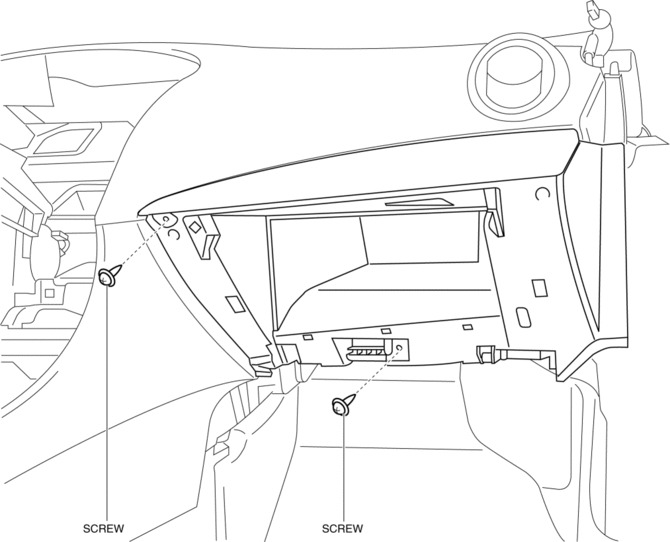
3. Remove the screws.
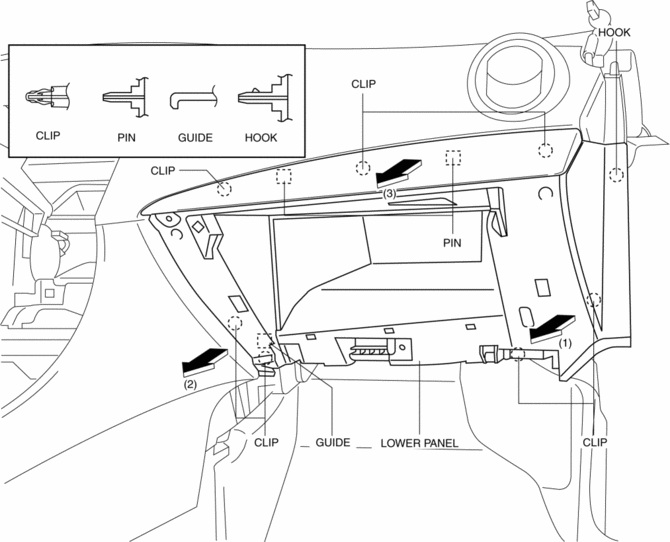
4. Pull the lower panel in the direction of the arrow in the order of (1) (2), (3) and remove the lower panel while detaching the hook, clips, guide and pins.
5. Install in the reverse order of removal.
 Inner Garnish Removal/Installation
1. Disconnect the negative battery cable..
2. Pull the inner garnish in the direction of the arrow shown in the figure and
remove it while detaching clips and tab.
CAUTION:
When pull ...
 Rear Package Trim Removal/Installation
1. Remove the following parts:
a. Rear seat cushion.
b. Rear scuff plate.
c. Tire house trim.
d. C-pillar trim.
2. Fold the rear seat back.
3. Remove the fasteners.
4. Pull up the re ...
Other materials:
Hazard Warning Switch Removal/Installation
1. Disconnect the negative battery cable..
2. Remove the center panel..
3. Remove in the order indicated in the table.
1
Screw
2
Hazard warning switch
4. Install in the reverse order of removal. ...
Oil Control Valve (OCV) Removal/Installation [Skyactiv G 2.0]
WARNING:
A hot engine can cause severe burns. Turn off the engine and wait until it
is cool before servicing.
1. Remove the battery cover..
2. Disconnect the negative battery cable..
3. Remove the plug hole plate..
4. Remove the ignition coil/ion sensors..
5. Remove the cyli ...
Fuel Tank Removal/Installation [Mzr 2.0, Mzr 2.5]
WARNING:
Fuel is very flammable liquid. If fuel spills or leaks from the pressurized
fuel system, it will cause serious injury or death and facility breakage. Fuel
can also irritate skin and eyes. To prevent this, always complete the “Fuel
Line Safety Procedure”, while referring ...
