
Mazda 3 Service Manual: Solenoid Valve Removal/Installation [FS5 A EL]
WARNING:
-
A hot transaxle and ATF can cause severe burns. Turn off the engine and wait until they are cool.
Primary Control Valve Body
1. Remove the primary control valve body.
a. Remove the battery cover..
b. Disconnect the negative battery cable.
c. Remove the aerodynamic under cover NO.2..
d. Clean the transaxle exterior throughout with a steam cleaner or cleaning solvents.
e. Drain the ATF..
f. Remove the oil pan..
g. Remove the primary control valve body..
2. Remove in the order indicated in the table.
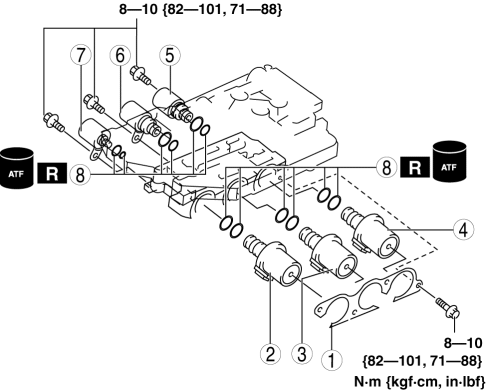
|
1 |
Bracket |
|
2 |
Shift solenoid A |
|
3 |
Shift solenoid C |
|
4 |
Shift solenoid B |
|
5 |
Shift solenoid E |
|
6 |
Shift solenoid D |
|
7 |
Pressure control solenoid A |
|
8 |
O-ring |
3. Install in the reverse order of removal.
4. Add the ATF..
5. Perform the “Mechanical System Test”..
6. Perform the “Road Test”..
Secondary Control Valve Body
1. Remove the secondary control valve body.
a. Remove the battery cover..
b. Disconnect the negative battery cable.
c. Remove the battery component (ex: battery, battery tray and PCM component)..
d. Remove the aerodynamic under cover NO.2..
e. Clean the transaxle exterior throughout with a steam cleaner or cleaning solvents.
f. Drain the ATF..
g. Remove the oil cover..
h. Remove the secondary control valve body..
2. Remove in the order indicated in the table.
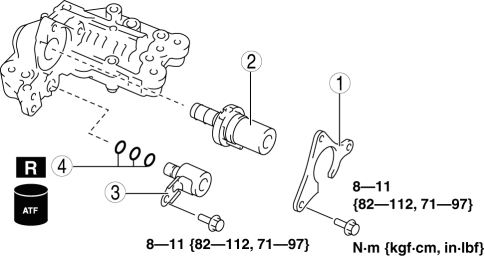
|
1 |
Bracket |
|
2 |
Pressure control solenoid B |
|
3 |
Shift solenoid F |
|
4 |
O-ring |
3. Install in the reverse order of removal.
4. Add the ATF..
5. Perform the “Mechanical System Test”..
6. Perform the “Road Test”..
 Solenoid Valve Inspection [FS5 A EL]
CAUTION:
Water or foreign objects entering the connector can cause a poor connection
or corrosion. Be sure not to drop water or foreign objects on the connector
when disconnecting it.
...
 Starter Interlock Switch Inspection [Mzr 2.0, Mzr 2.5]
CAUTION:
Do not reuse the starter interlock switch if it is removed from the vehicle
even once. Replace with a new starter interlock switch when installing.
1. Remove the battery cove ...
Other materials:
Voice Recognition (Type A)
In this section, the basic operation of the
voice recognition is explained.
Activating Voice Recognition
To Activate the Main Menu: Press the
pick-up button or talk button with a short
press.
Ending Voice Recognition
Use one of the following methods:
Press and hold the talk-button.
Pres ...
Front Door Trim Removal/Installation
1. Disconnect the negative battery cable..
2. Remove the inner garnish..
3. Move the hook in the direction of arrow shown in the figure using a tape-lapped
flathead screwdriver and detach it from the front door trim.
CAUTION:
Affix protective tape to the front door trim and assis ...
Charcoal Canister Inspection [Mzr 2.0, Mzr 2.5]
Leakage Inspection
1. Perform the following procedures:
Assemble the hose used for inspection to port A.
Cover ports B and C with the caps.
Except for Mexico
Mexico
CAUTION:
Do not apply a pressure 20 kPa {150 mmHg, 5.91 inHg} or more to the charcoal
cani ...
