
Mazda 3 Service Manual: Ion Sensor Inspection [Skyactiv G 2.0]
DTC Inspection
NOTE:
-
Because the ion sensor is integrated in the ignition coil, replacing the ion sensor includes replacement of the ignition coil/ion sensor.
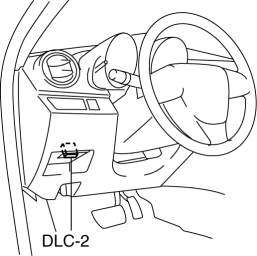
1. Connect the M-MDS to the DLC-2.
2. Perform the DTC inspection using the M-MDS..
-
If any DTC related to the ignition coil/ion sensor is present, repair the malfunctioning location according to the applicable DTC troubleshooting..
Visual Inspection
NOTE:
-
Because the ion sensor is integrated in the ignition coil, replacing the ion sensor includes replacement of the ignition coil/ion sensor.
1. Remove the battery cover..
2. Disconnect the negative battery cable..
3. Remove the plug hole plate..
4. Remove the ignition coil/ion sensor..
5. Verify that there is no damage to the ignition coil/ion sensor, and no corrosion and damage to the connector.
-
If there is a malfunction, replace the ignition coil/ion sensor..
 Front Seat Belt Removal/Installation [Two Step Deployment Control System]
WARNING:
Handling the front seat belt (pre-tensioner seat belt) improperly can accidentally
deploy the pre-tensioner seat belt, which may seriously injure you. Read the
air bag system se ...
 Neutral Switch Inspection [Mzr 2.0, Mzr 2.5]
Continuity Inspection
1. Remove the battery cover..
2. Disconnect the negative battery cable..
3. Disconnect the neutral switch connector..
4. When the shift lever is in neutral and in a positi ...
Other materials:
Rear Beltline Molding Removal/Installation
1. Fully open the rear door glass.
2. Remove the rear door trim..
3. Remove clip A using a fastener remover and pull up the rear beltline molding
in the direction of the arrow (1) shown in the figure.
4. Remove clip B using a fastener remover and pull up the rear beltline molding
in the di ...
Front Door Key Cylinder Switch Inspection
1. To access the glass installation bolt, position the front door glass so that
the distance from the top of the front door glass to the upper part of the front
beltline molding is approx. 80 mm {3.1 in}.
2. Disconnect the negative battery cable..
3. Remove the following parts:
a. Inne ...
Warning Light
The warning light turns on when the
system has a malfunction.
Refer to Warning Lights on .
Brake Pad Wear Indicator
When the disc brake pads become worn,
the built-in wear indicators contact the
disc plates. This causes a screeching noise
to warn that the pads should be replaced.
When ...
