
Mazda 3 Service Manual: M Position Switch Inspection [Fw6 A EL]
Continuity Inspection
NOTE:
-
The M position switch is built into the selector lever component.
1. Remove the battery cover..
2. Disconnect the negative battery cable..
3. Remove the console..
4. Disconnect the selector lever component connector.
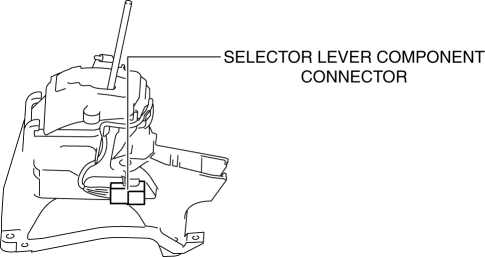
5. Verify that the continuity between selector lever component terminals A and H.
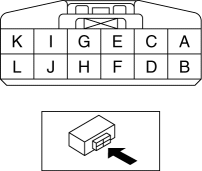
-
If not as verified, replace the selector lever component..
|
Test condition |
Continuity |
|
Selector lever is in the M position. |
Continuity |
|
Selector lever is not in the M position. |
No continuity |
 M Position Switch Inspection [FS5 A EL]
1. Perform the following procedures.
a. Remove the battery cover..
b. Disconnect the negative battery cable.
c. Remove the console..
d. Disconnect the selector lever component connector.
...
 Neutral Switch Removal/Installation [A26 M R]
1. Disconnect the negative battery cable.
2. Disconnect the neutral switch connector.
3. Remove the aerodynamic under cover No.2..
4. Remove the neutral switch with the gasket.
5. Install ...
Other materials:
After Service Precaution [Mzr 2.0, Mzr 2.5]
WARNING:
Fuel line spills and leakage are dangerous. Fuel can ignite and cause serious
injuries or death and damage. When installing the fuel hose, perform “Fuel Leakage
Inspection” described below.
A person charged with static electricity could cause a fire or explosion,
...
Luggage compartment features
Cargo hooks
In the Subaru Solterra, cargo hooks are designed to provide convenient anchoring
points for securing loose items within the luggage compartment, helping to prevent
movement during driving.
Lift the hooks upward when needed for use, ensuring proper positioning before
attaching str ...
Cleaning and protecting the vehicle interior
For the Subaru Solterra, interior cleaning should always be performed
according to the specific material of each component in order to preserve durability,
appearance, and long-term comfort.
Protecting the vehicle interior
In the Subaru Solterra, begin cleaning by removing dust and debris u ...
