
Mazda 3 Service Manual: Map Light Inspection
1. Disconnect the negative battery cable..
2. Remove the map light..
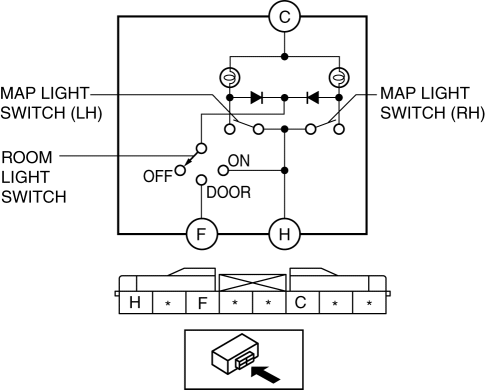
3. Verify that the continuity between the map light terminals is as indicated in the table.
-
If not as indicated in the table, inspect the bulb. If there is no malfunction, replace the map light.
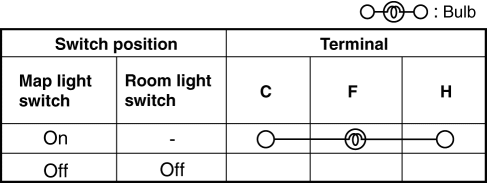
4. Apply battery positive voltage to map light terminal C, and connect terminal F to ground.
5. Switch the interior light switch to the DOOR position and verify that the map light illuminates.
-
If the light does not illuminate, replace the map light.
 Map Light Bulb Removal/Installation
1. Disconnect the negative battery cable..
2. Insert a tape-wrapped fastener remover into the service hole and pry with
the screwdriver in the direction shown by the arrow to remove the lens.
...
 Map Light Removal/Installation
1. Disconnect the negative battery cable..
2. Remove the tabs shown in the figure.
3. Pull the map light in the direction of the arrow (1) shown in the figure and
remove the map light while ...
Other materials:
Body Control Module (Bcm) Configuration
1. Connect the M-MDS to DLC-2.
2. After the vehicle is identified, select the following items from the initial
screen of the M-MDS.
When using the IDS (laptop PC)
Select “Module Programming”.
Select “Programmable Module Installation”.
Select ...
Air Bag Module And Pre Tensioner Seat Belt Disposal Procedures
WARNING:
A live (undeployed) air bag module or pre-tensioner seat belt may accidentally
operate (deploy) when it is disposed of and cause serious injury. Always refer
to the “AIR BAG MODULE AND PRE-TENSIONER SEAT BELT DEPLOYMENT PROCEDURES” and
dispose of air bag modules and p ...
Child-Restraint System Installation
Child-Restraint System Types
In this owner's manual, explanation of
child-restraint systems is provided for the
following three types of popular childrestraint
systems: infant seat, child seat,
booster seat.
NOTE
Installation position is determined
by the type of child-restraint system.
...
