
Mazda 3 Service Manual: Map Light Removal/Installation
1. Disconnect the negative battery cable..
2. Remove the tabs shown in the figure.
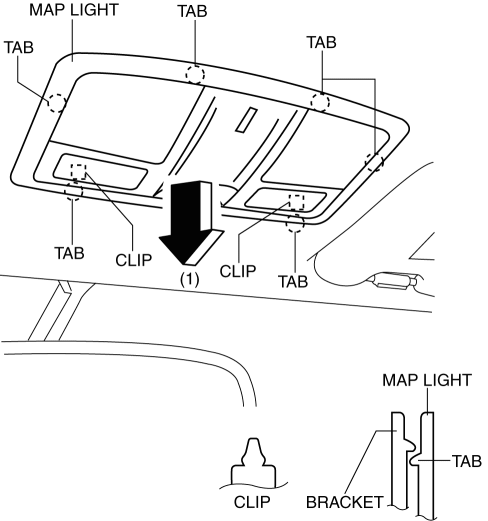
3. Pull the map light in the direction of the arrow (1) shown in the figure and remove the map light while detaching the clips.
4. Disconnect the connector.
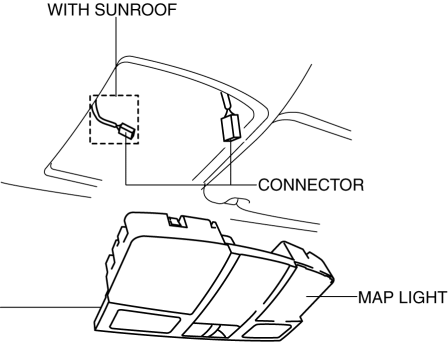
5. Install in the reverse order of removal.
 Map Light Inspection
1. Disconnect the negative battery cable..
2. Remove the map light..
3. Verify that the continuity between the map light terminals is as indicated
in the table.
If not as indicated i ...
 Vanity Mirror Illumination Bulb Removal/Installation
1. Disconnect the negative battery cable..
2. Insert a tape-wrapped fastener remover into the service hole, and pry it in
the direction indicated by the arrow to remove the lens.
3. Remove t ...
Other materials:
Input/Turbine Speed Sensor Removal/Installation [FS5 A EL]
CAUTION:
Always use a new bolt. If the removed input/turbine speed sensor installation
bolt is reused, it may cause oil leakage.
A sealant coating is applied to the input/turbine speed sensor installation
bolt to prevent oil leakage from the installation bolt hole which passes ...
Blind Spot Monitoring (Bsm) Control Module Removal/Installation
CAUTION:
If the BSM control modules are installed with the left and right modules
reversed, a DTC will be displayed and system will enter the fail-safe function.
Therefore, confirm that the left/right BSM control modules are installed correctly.
1. Disconnect the negative battery ...
Windshield Defrosting and
Defogging
Set the mode selector dial to the
position and turn the fan control dial to the
desired speed.
In this position, the outside air position is automatically selected, and when
the fan control dial is ON, the air conditioner automatically turns on. The air
conditioner will directly dehumidify ...
