
Mazda 3 Owners Manual: Meters and Gauges
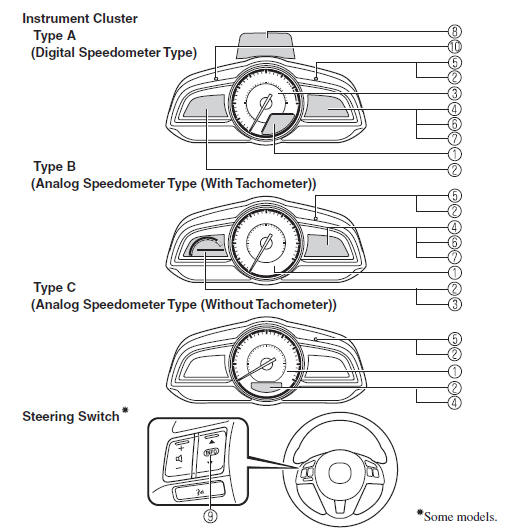
- Speedometer
- Odometer, Trip Meter and Trip Meter Selector
- Tachometer
- Fuel Gauge
- Dashboard Illumination.
- Outside Temperature Display .
- Cruise Control Set Vehicle Speed Display
- Active Driving Display
- Trip Computer and INFO Switch
- Speed Unit Selector
- Speedometer
- Tachometer
- Fuel Gauge
- Dashboard Illumination
- Outside Temperature Display
- Cruise Control Set Vehicle Speed Display

 Speedometer
The speedometer indicates the speed of the
vehicle.
Speed Unit Selector (Type A
Instrument Cluster)
In some countries, you may have to
change the speed units between km/h and
mph.
Press the s ...
Other materials:
Wheel Hub Component Inspection
Wheel Bearing Excessive Play Inspection
1. Remove the brake caliper component and disc plate..
2. Install the magnetic base and dial gauge as shown in the figure and measure
the wheel bearing axial excessive play.
If it exceeds the maximum specification, replace the wheel hub compon ...
Afs (Adaptive Front Lighting System) Control Module Removal/Installation
NOTE:
Perform the auto leveling system initialization after newly replacing the
AFS control module to assure that the auto leveling system operates correctly.
1. Disconnect the negative battery cable..
2. Remove the following parts:
a. Passenger-side front scuff plate.
b. Pass ...
Side Step Molding Removal
1. Remove the fasteners A.
2. Using the removal tool, disengage clips B in the direction of the arrow (1),
(2) shown in the figure.
NOTE:
Leave the disengaged clip B in place in consideration of the servicing.
3. Slide the side step molding in the direction of the arrow ( ...
