
Mazda 3 Service Manual: Neutral Switch Removal/Installation [C66 M R]
1. Remove the battery cover..
2. Disconnect the negative battery cable..
3. Remove the aerodynamic under cover No.2..
4. Install in the reverse order of removal.
5. Remove in the order indicated in the table.
6. Install in the reverse order of removal.
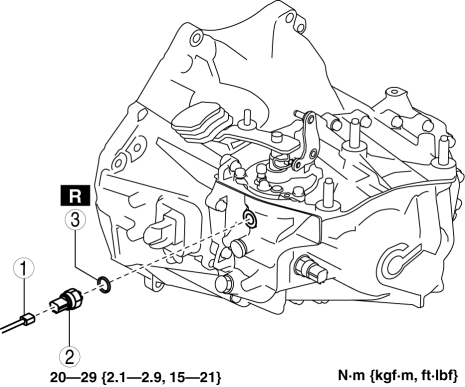
|
1 |
Neutral switch connector |
|
2 |
Neutral switch |
|
3 |
Gasket |
 Neutral Switch Removal/Installation [A26 M R]
1. Disconnect the negative battery cable.
2. Disconnect the neutral switch connector.
3. Remove the aerodynamic under cover No.2..
4. Remove the neutral switch with the gasket.
5. Install ...
 Neutral Switch Removal/Installation [G35 M R]
1. Remove the battery cover..
2. Disconnect the negative battery cable.
3. Remove the battery component. (ex: battery, battery tray and PCM component)(See
BATTERY REMOVAL/INSTALLATION [MZR 2.0, ...
Other materials:
Fuel Filler Cap Inspection [Mzr 2.0, Mzr 2.5]
Leakage Inspection
1. Perform the following SST (Evaporative Emission System Tester 134-01049A)
self-test:
NOTE:
If the tester does not work correctly during self-test, refer to the tester
operators manual for more detailed procedures.
a. Verify that the gas cylinder valve is c ...
Washer Tank Removal/Installation
Vehicles with the washer fluid-level sensor
1. Disconnect the negative battery cable..
2. Remove the front bumper..
3. Remove in the order indicated in the table.
1
Washer motor connector
2
Windshield washer hose
3
...
If the vehicle becomes stuck
If your Subaru Solterra becomes immobilized in mud, snow, or loose
terrain, follow the steps below to safely regain traction and mobility.
Recovering procedure
1. Turn off the EV system, apply the parking brake, and set the gear selector
to P.
2. Clear away mud, snow, or sand from around the ...
