
Mazda 3 Service Manual: PCM Configuration [Mzr 2.0, Mzr 2.5]
CAUTION:
-
If the wheel and tire sizes are changed, a discrepancy with the speedometer needle whereby it exceeds the allowable range could result in a malfunction. If the wheel and tire sizes are changed, perform the following procedure to change the tire size parameter setting..
1. Connect the M-MDS (IDS) to DLC-2.
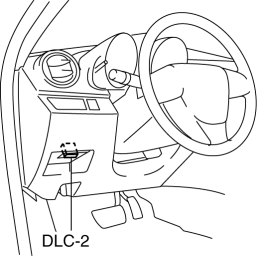
2. After the vehicle is identified, select the following items from the initial screen of the M-MDS (IDS).
a. “Module Programming”
3. Select “Programmable Module Installation”.
4. Select menu in the “PCM”.
5. Perform the configuration according to the directions on the screen.
6. Retrieve DTCs by the M-MDS (IDS), then verify that there is no DTC present.
-
If a DTC(s) is detected, perform the applicable DTC inspection..
 Neutral Switch Inspection [Mzr 2.0, Mzr 2.5]
Continuity Inspection
1. Remove the battery cover..
2. Disconnect the negative battery cable..
3. Disconnect the neutral switch connector..
4. When the shift lever is in neutral and in a positi ...
 PCM Inspection [Mzr 2.0, Mzr 2.5]
Using M-MDS
NOTE:
PIDs for the following parts are not available on this model. Go to the appropriate
part inspection page.
CMP sensor
Main relay
1. Co ...
Other materials:
Cruise Control Set Vehicle Speed Display
The vehicle speed preset using the cruise
control is displayed.
Trip Computer and INFO Switch
The following information can be selected
by pressing the up or down
part of the
INFO switch with the ignition switched
ON.
Approximate distance you can travel on
the available fuel
Ave ...
Passenger Compartment Temperature Sensor Removal/Installation [Full Auto Air
Conditioner]
1. Disconnect the negative battery cable..
2. Remove the following parts:
a. Front scuff plate.
b. Front side trim.
c. Dashboard under cover.
d. Upper panel.
e. Shift lever knob (MTX).
f. Selector lever knob (ATX).
g. Shift panel.
h. Side wall.
i. Console.
j. Hood release lever ...
Vehicle Speed Sensor (VSS) Removal/Installation [FS5 A EL]
CAUTION:
If foreign materials are stuck to the sensor, disturbance by magnetic flux
can cause sensor output to be abnormal and thereby negatively affect control.
Make sure that foreign materials such as iron filings are not stuck to the sensor
during installation.
1. Perform t ...
