
Mazda 3 Service Manual: Rear ABS Wheel Speed Sensor Removal/Installation
1. Remove the under cover..
2. Remove in the order indicated in the table.
3. Install in the reverse order of removal.
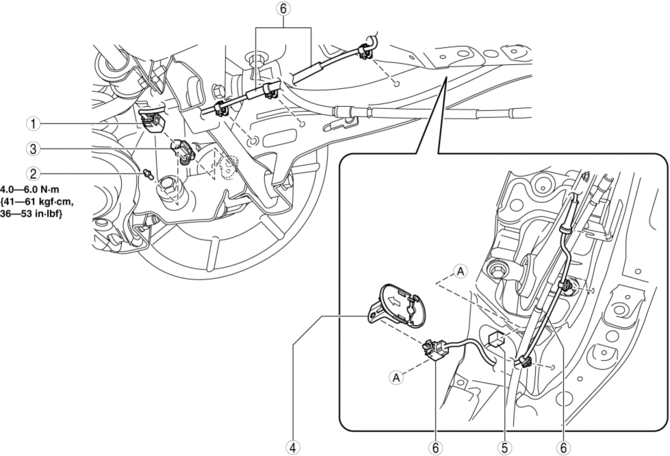
|
1 |
Connector |
|
2 |
Bolt |
|
3 |
Rear ABS wheel-speed sensor |
|
4 |
ABS hole cover . |
|
5 |
Connector |
|
6 |
Rear ABS wheel-speed sensor wiring harness (See Rear ABS Wheel-speed Sensor Wiring Harness Installation Note.) |
ABS Hole Cover Removal Note
1. Press the tab of the ABS hole cover to separate the ABS hole cover from the body.
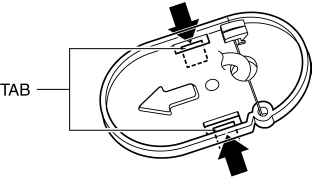
2. Remove the ABS hole cover from the body.
Rear ABS Wheel-speed Sensor Wiring Harness Installation Note
1. Pass the rear ABS wheel-speed sensor wiring harness outside the rear parking brake cable as shown in the figure.
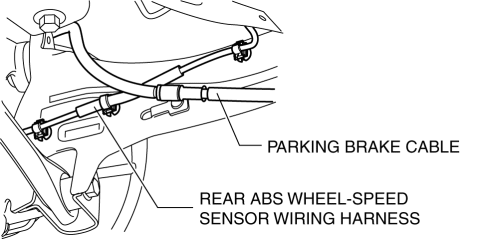
2. Install the rear ABS wheel-speed sensor wiring harness.
ABS Hole Cover Installation Note
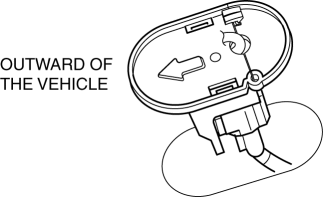
1. Install the ABS hole cover into the body so that the arrow on it is facing toward the outer side of the vehicle.
 Rear ABS Wheel Speed Sensor Inspection
Installation Visual Inspection
1. Inspect for the following:
If there is any malfunction, replace the part.
a. Excessive looseness or play of the rear ABS wheel-speed sensor
b. Deform ...
 Disc Brakes
...
Other materials:
Rear Door Quarter Glass Removal/Installation
1. Fully lower the rear door glass.
2. Disconnect the negative battery cable..
3. Remove the rear door trim..
4. Remove the service hole cover.
5. Remove the hole plug.
6. Remove the screw.
7. Remove the bolt A and B.
8. Remove the rear door glass guide.
9. Remove the pin ...
Air Bag Module And Pre Tensioner Seat Belt Deployment Procedures [Standard Deployment
Control System]
WARNING:
A live (undeployed) air bag module or pre-tensioner seat belt may accidentally
operate (deploy) when it is disposed of and cause serious injury. Do not dispose
of a live (undeployed) air bag module and pre-tensioner seat belt. If the SSTs
(Deployment tool and Adapter harnes ...
Transaxle Oil Replacement [G35 M R]
1. Park the vehicle on level ground.
2. Remove the aerodynamic under cover No.2..
3. Remove the drain plug and washer.
4. Drain the oil into a suitable container.
5. Install a new washer and the drain plug.
Tightening torque
39—59 N·m {4.0—6.0 kgf·m, 29—43 ft·lbf}
...
