
Mazda 3 Owners Manual: Recommendations for Shifting (for Vehicles without Gear Shift Indication)
Upshifting
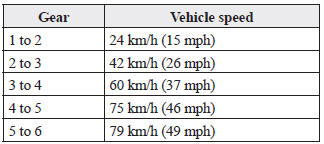
For normal acceleration, Mazda recommends these shift points: (U.S.A. and Canada)
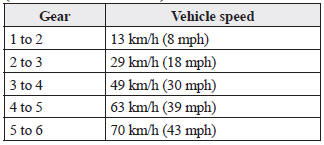
For cruising, Mazda recommends these shift points: (U.S.A. and Canada)
Downshifting
When you must slow down in heavy traffic or on a steep upgrade , downshift before the engine starts to overwork. This reduces the chance of stalling and gives better acceleration when you need more speed.
On a steep downgrade , downshifting helps maintain safe speed and prolongs brake life
 Gear Shift Indicator
The gear shift indicator supports you to
obtain optimum fuel economy and smooth
driving. It displays the selected gear
position in the instrument cluster as well
as notifies the driver to change t ...
 Automatic Transaxle Controls
Various Lockouts:
Indicates that you must depress
the brake pedal and hold in the lock-release
button to shift (The ignition must be switched ON).
Indicates the shift lever can be
shifted ...
Other materials:
Pre-programming the HomeLink
System
NOTE
It is recommended that a new battery be
placed in the hand-held transmitter of the
device being programmed to HomeLink
for quicker training and accurate
transmission of the radio-frequency signal.
Verify that there is a remote control
transmitter available for the device you
would ...
Transaxle Oil Inspection [G35 M R]
1. Park the vehicle on level ground.
2. Remove the aerodynamic under cover No.2..
3. Remove the oil level plug and washer.
4. Verify that the oil is near the brim of the plug port.
If the oil level is lower than the low level, add the specified amount and
type of oil through the ...
Oil Seal (Control Valve Body) Replacement [Fw6 A EL]
1. Remove the battery cover..
2. Disconnect the negative battery cable..
3. Remove the air cleaner component..
4. Disconnect the control valve body connector.
5. Remove the hose clamp.
6. Cut the oil seal using a utility knife as shown in the following illustration.
CAUTION: ...
