
Mazda 3 Service Manual: Refrigerant Pressure Sensor Inspection [Manual Air Conditioner]
MZR 2.0, MZR 2.5
1. Install the manifold gauge.
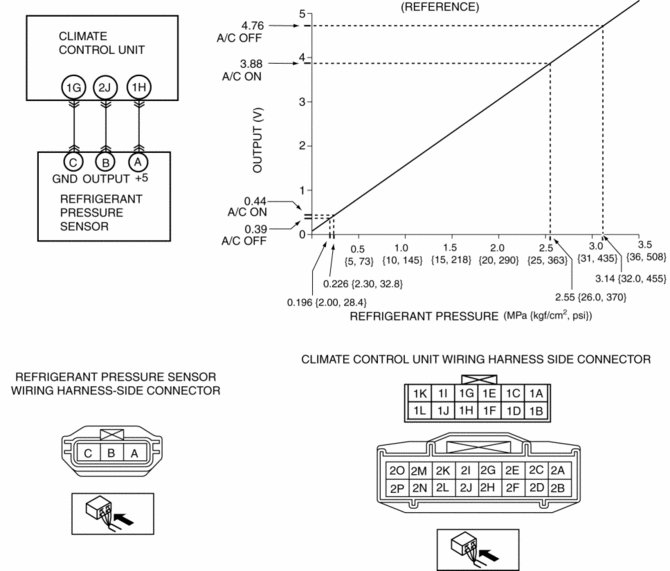
2. Verify the high-pressure side reading of the manifold gauge.
3. Measure the terminal voltage of the climate control unit.
-
1G,1H and 2J
4. Verify that below graph as measure the terminal voltage 2J.
5. Follow the climate control unit inspection when measure the other terminal voltage..
-
Terminal 1G: 1.0 V or less
-
Terminal 1H: Approx. 5 V (Ignition switch on)
-
If the each voltage is not normal, inspect the related wiring harness.
-
If there is any malfunction, replace the related wiring harness.
-
If wiring harness is normal, replace the refrigerant pressure sensor.
SKYACTIV-G 2.0
1. Install the manifold gauge.
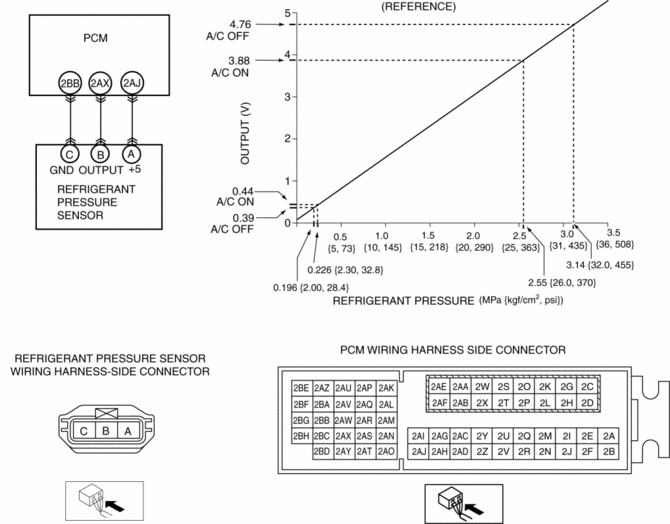
2. Verify the high-pressure side reading of the manifold gauge.
3. Measure the terminal voltage of the PCM.
-
2BB, 2AX and 2AJ
4. Verify that below graph as measure the terminal voltage 2AX.
5. Follow the PCM inspection when measure the other terminal voltage..
-
Terminal 2BB: 1.0 V or less
-
Terminal 2AJ: Approx. 5 V (Ignition switch on)
-
If the each voltage is not normal, inspect the related wiring harness.
-
If there is any malfunction, replace the related wiring harness.
-
If wiring harness is normal, replace the refrigerant pressure sensor.
 Refrigerant Pressure Sensor Inspection [Full Auto Air Conditioner]
MZR 2.3 DISI Turbo, MZR 2.5
1. Install the manifold gauge.
2. Verify the high-pressure side reading of the manifold gauge.
3. Measure the terminal voltage of the climate control unit.
1C, ...
 Refrigerant Pressure Sensor Removal/Installation [Full Auto Air Conditioner]
1. Disconnect the negative battery cable..
2. Discharge the refrigerant..
3. Disconnect the refrigerant pressure sensor connector.
CAUTION:
If moisture or foreign material enters the ref ...
Other materials:
Transaxle Fluid Temperature (Tft) Sensor Removal/Installation [FS5 A EL]
WARNING:
A hot transaxle and ATF can cause severe burns. Turn off the engine and wait
until they are cool.
1. Remove the primary control valve body.
a. Remove the battery cover..
b. Disconnect the negative battery cable.
c. Remove the aerodynamic under cover NO.2..
d. Clean ...
Master Cylinder Removal/Installation [Mzr 2.0, Skyactiv G 2.0, Mzr 2.5]
1. Remove the battery and battery tray..
2. Remove in the order indicated in the table.
3. Install in the reverse order of removal.
1
Brake fluid level sensor connector
2
Reserve hose (MTX)
(See Reserve Hose (MTX) Removal Note.)
(Se ...
Steering Gear And Linkage Assembly
CAUTION:
To prevent damage to the steering gear, secure it to the vise using a copper
plate or clean cloth.
1. Assemble in the order indicated in the table.
1
Gear housing
2
Mounting rubber
(See Mounting Rubber Assembly No ...
