
Mazda 3 Service Manual: Refrigerant Pressure Sensor Inspection [Full Auto Air Conditioner]
MZR 2.3 DISI Turbo, MZR 2.5
1. Install the manifold gauge.
2. Verify the high-pressure side reading of the manifold gauge.
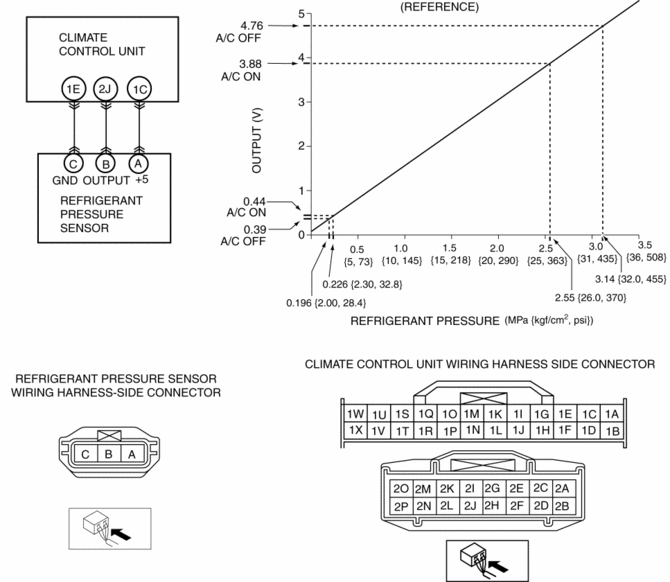
3. Measure the terminal voltage of the climate control unit.
-
1C, 1E and 2J
4. Verify that below graph as measure the terminal voltage 2J.
5. Follow the climate control unit inspection when measure the other terminal voltage..
-
Terminal 1E: 1.0 V or less
-
Terminal 1C: Approx. 5 V (Ignition switch on)
-
If the each voltage is not normal, inspect the related wiring harness.
-
If there is any malfunction, replace the related wiring harness.
-
If wiring harness is normal, replace the refrigerant pressure sensor.
SKYACTIV-G 2.0
1. Install the manifold gauge.
2. Verify the high-pressure side reading of the manifold gauge.
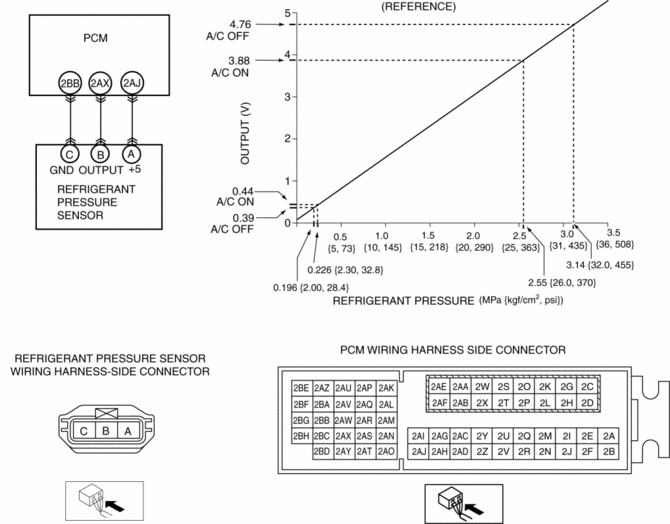
3. Measure the terminal voltage of the PCM.
-
2BB, 2AX and 2AJ
4. Verify that below graph as measure the terminal voltage 2AX.
5. Follow the PCM inspection when measure the other terminal voltage..
-
Terminal 2BB: 1.0 V or less
-
Terminal 2AJ: Approx. 5 V (Ignition switch on)
-
If the each voltage is not normal, inspect the related wiring harness.
-
If there is any malfunction, replace the related wiring harness.
-
If wiring harness is normal, replace the refrigerant pressure sensor.
 Pressure Sensor Removal/Installation [Two Step Deployment Control System]
1. Switch the ignition to off.
2. Disconnect the negative battery cable and wait for 1 min or more..
3. Remove the inner garnish..
4. Remove the front door trim..
5. Remove the bolts.
6 ...
 Refrigerant Pressure Sensor Inspection [Manual Air Conditioner]
MZR 2.0, MZR 2.5
1. Install the manifold gauge.
2. Verify the high-pressure side reading of the manifold gauge.
3. Measure the terminal voltage of the climate control unit.
1G,1H and 2J
...
Other materials:
Oil Cooler Flushing [FS5 A EL]
NOTE:
If the automatic transaxle is replaced, flush and inspect the oil cooler.
When replacing the automatic transaxle, inspect the oil cooler together with
flushing it using the following procedures, and with the oil cooler hose removed.
1. Disconnect the oil hose.
2. Set ...
Heated Oxygen Sensor (HO2 S) Inspection [Mzr 2.0, Mzr 2.5]
HO2S Inspection
1. Connect the M-MDS to the DLC-2.
2. Switch the ignition to ON.
3. Warm up the engine to normal operating temperature.
4. Access the following PIDs using the M-MDS..
VSS (Vehicle speed)
RPM (Engine speed)
O2S12 (HO2S output voltage)
5. Drive ...
Electric Variable Valve Timing Actuator, Hydraulic Variable Valve Timing Actuator
Removal/Installation [Skyactiv G 2.0]
WARNING:
A hot engine can cause severe burns. Turn off the engine and wait until it
is cool before servicing.
CAUTION:
Do not disassemble the electric variable valve timing actuator and hydraulic
variable valve timing actuator because they are precision units.
If ...
