
Mazda 3 Service Manual: Starter Interlock Switch Removal/Installation [C66 M R]
1. Remove the battery cover..
2. Disconnect the negative battery cable..
3. Disconnect the starter interlock switch connector.
4. Remove the starter interlock switch from the pedal bracket.
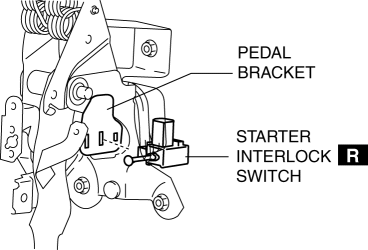
5. Insert a new starter interlock switch into the pedal bracket hole in the direction indicated by arrow A.
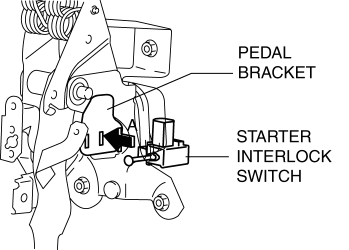
6. Slide the starter interlock switch pressing it in the direction indicated by arrow B until it is locked.
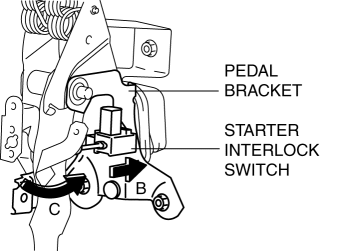
7. Fully depress the clutch pedal in the direction of arrow C, and verify that a click sound from the starter interlock switch is heard.
8. Install in the reverse order of removal.
9. Fully depress the clutch pedal, and verify that the engine starts.
 Starter Interlock Switch Inspection [Skyactiv G 2.0]
CAUTION:
Do not reuse the starter interlock switch if it is removed from the vehicle
even once. Replace with a new starter interlock switch when installing.
1. Remove the battery cove ...
 TCM Configuration [Fw6 A EL]
NOTE:
The TCM is built into the control valve body.
1. Verify TCM configuration implementation necessity for replacement parts.
Replacement part
Conf ...
Other materials:
Tire inflation pressure
Maintaining the correct tire inflation pressure in your Subaru Solterra
is essential for ensuring safety, efficiency, and optimal driving performance.
Tire pressure in the Subaru Solterra should be checked regularly.
While a monthly check is the minimum requirement, SUBARU strongly recommends i ...
Wrench Indicator Light
When the ignition is switched ON, the
wrench indicator light is illuminated and
then turns off after a few seconds.
The wrench indicator light is illuminated
when the preset maintenance period
arrives. Verify the content and perform
maintenance.
Refer to Maintenance Monitor on .
Low ...
Battery
WARNING
Wash hands after handling the battery and related accessories:
Battery posts, terminals and related accessories contain lead and lead
compounds,
chemicals known to the State of California to cause cancer and
reproductive harm.
Read the following
precautions ...
