
Mazda 3 Service Manual: Trunk Lid Trim Removal/Installation
1. Remove the fasteners, then remove the trunk lid trim.
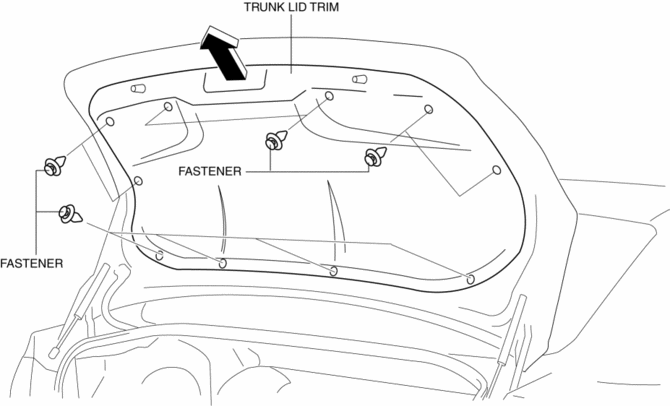
2. Install in the reverse order of removal.
 Rear Door Trim Removal/Installation
1. Disconnect the negative battery cable..
2. Move the hook in the direction of arrow shown in the figure using a tape-lapped
flathead screwdriver and detach it from the rear door trim.
CAUT ...

Other materials:
Power/Volume/Sound Controls
Power ON/OFF
Switch the ignition to ACC or ON. Press
the power/volume dial to turn the audio
system on. Press the power/volume dial
again to turn the audio system off.
Volume adjustment
To adjust the volume, turn the power/
volume dial. Turn the power/volume
dial clockwise to increase vo ...
Electric Power Steering Oil Pump Component Disassembly/Assembly
CAUTION:
The internal parts of the EHPAS control module and motor could be damaged
if they receive an impact. Be careful when handling the EHPAS control module
and motor to prevent the component from getting hit. Replace the electric power
steering oil pump component if it has recei ...
Rear ABS Wheel Speed Sensor Inspection
Installation Visual Inspection
1. Inspect for the following:
If there is any malfunction, replace the part.
a. Excessive looseness or play of the rear ABS wheel-speed sensor
b. Deformation of the rear ABS wheel-speed sensor
c. Deformation or damage of the rear ABS sensor rotor
C ...
