
Mazda 3 Service Manual: Air Filter Removal/Installation
1. Disconnect the negative battery cable..
2. Remove the side wall..
3. Disconnect the evaporator temperature sensor connector.
4. Disconnect the power MOS FET connector. (Full-auto air conditioner)
5. Disconnect the resistor connector. (Manual air conditioner)
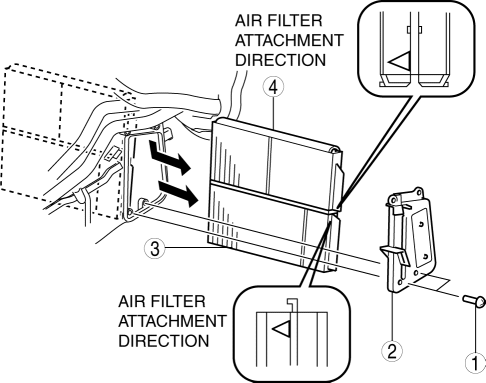
6. Remove in the order indicated in the table.
|
1 |
Screw |
|
2 |
Air filter cover |
|
3 |
Air filter (2) (See Air Filter Installation Note.) |
|
4 |
Air filter (1) (See Air Filter Installation Note.) |
7. Install in the reverse order of removal.
Air Filter Installation Note
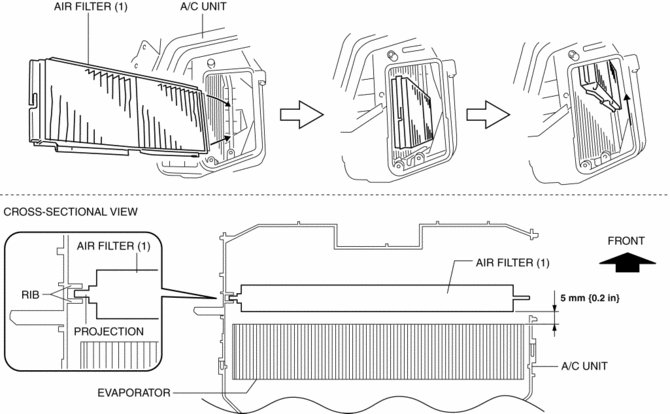
1. Insert the air filter projection between the ribs of the A/C unit and assemble the air filter (1) in the order shown in the figure.
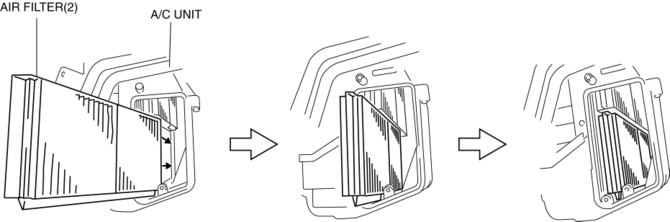
2. Assemble the air filter (2) in the order shown in the figure.
 Air Filter Inspection [Mzr 2.0, Mzr 2.5]
Except for Mexico
Airflow inspection
1. Remove the air filter..
2. Blow from port A and verify that there is airflow from port B.
If there is no airflow, replace the air filter..
...
 Air Filter Removal/Installation [Mzr 2.0, Mzr 2.5]
Except for Mexico
1. Remove the fuel-filler pipe protector..
2. Remove in the order indicated in the table.
1
Evaporative hose
2
Air filter ...
Other materials:
Supplemental Restraint System (SRS) Precautions
The front and side supplemental restraint systems (SRS) include different
types of air bags.
Please verify which kinds of air bags are equipped on your vehicle by locating
the
“SRS AIRBAG” location indicators. These indicators are visible in the area where
the air
bags are installed.
...
Smart City Brake Support
(SCBS)
The Smart City Brake Support (SCBS) system is designed to reduce damage in
the event
of a collision by operating the brake control (SCBS brake) when the system's
laser sensor
(front) detects a vehicle ahead and determines that a collision with a vehicle
ahead is
unavoidable. It may also be ...
If your vehicle overheats
If the message "EV System overheated Output power reduced" appears
on the multi-information display of your Subaru Solterra, it indicates that the
system temperature has risen beyond optimal limits and immediate action is required
to prevent potential damage.
NOTICE
■ Cooling system coolan ...
