
Subaru Solterra 2023-2026 Owner's Manual: Automatic air conditioning system
In the Subaru Solterra, the automatic air conditioning system intelligently regulates airflow distribution and fan speed in real time, ensuring that the interior climate remains consistent with the selected temperature settings for maximum comfort and efficiency.
Air conditioning controls
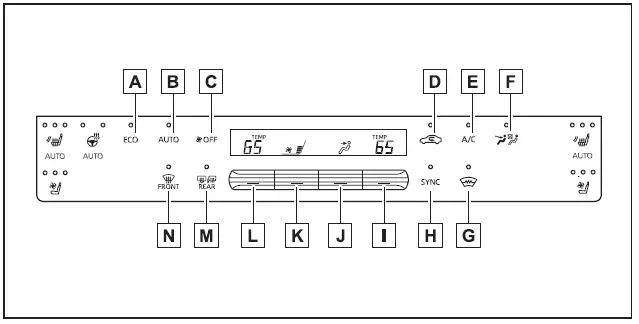
- Eco air conditioning mode
- ALL AUTO (ECO) switch
- "OFF" switch
- Outside/recirculated air mode switch
- "A/C" switch
- Front seat concentrated airflow mode (S-FLOW) switch
- Windshield wiper de-icer switch
- "SYNC" switch
- Right-hand side temperature control switch
- Airflow mode control switch
- Fan speed control switch
- Left-hand side temperature control switch
- Rear window and outside rear view mirror defogger switch
- Windshield defogger switch
■ Adjusting the temperature setting
In the Subaru Solterra, adjust the desired cabin temperature by pressing the temperature control switch upward to increase warmth or downward to reduce it, allowing precise climate customization for both driver and passengers.
If the "A/C" function is not activated, the Subaru Solterra system will supply either ambient air or heated air depending on current environmental conditions and temperature settings.
■ Setting the fan speed
Fan speed in the Subaru Solterra can be manually controlled by pressing the fan speed switch upward to increase airflow or downward to reduce it, depending on comfort requirements.
To completely stop airflow, press the "OFF" switch, which disables the fan while preserving other system settings.
■ Change the airflow mode
Use the airflow mode control switch in the Subaru Solterra to adjust how air is distributed throughout the cabin by pressing upward or downward.
Each press cycles through different airflow configurations as follows:
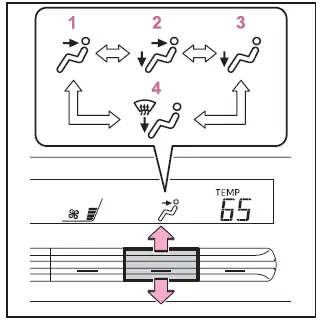
- Air is directed toward the upper body area.
- Air is distributed between the upper body and foot area.
- Air is directed primarily toward the foot area.
- Air is directed toward the feet while simultaneously activating the windshield defogger.
■ Switching between outside air and recirculated air modes
Press the outside/recirculated air mode switch in the Subaru Solterra to toggle between fresh air intake (indicator off) and recirculated cabin air (indicator on), depending on air quality and cooling efficiency preferences.
■ Set cooling and dehumidification function
Activate the cooling and dehumidification function by pressing the "A/C" switch. When engaged, the indicator light confirms that the system is actively conditioning the air inside the Subaru Solterra.
■ Defogging the windshield
The Subaru Solterra defogging system is designed to quickly clear condensation from the windshield and front side windows for improved visibility.
Press the windshield defogger switch to activate this function.
If the system is set to recirculated air mode, it will automatically switch to outside air mode when necessary to improve defogging efficiency. For faster results, increase airflow and temperature settings.
Once the windshield is clear, press the defogger switch again to return to the previous climate mode.
When active, the defogger indicator on the Subaru Solterra control panel will illuminate.
■ Defogging the rear window and outside rear view mirrors
The rear defogger system in the Subaru Solterra removes moisture, frost, and condensation from the rear window and exterior mirrors to maintain clear rearward visibility.
Press the rear window and mirror defogger switch to activate the system.
The system will automatically turn off after a preset period to conserve energy.
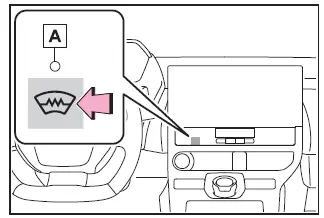
■ Windshield wiper de-icer
This function prevents ice accumulation around the windshield and wiper blade area, ensuring proper wiper performance during cold weather operation of the Subaru Solterra.
Press the windshield wiper de-icer switch to activate the feature.
The indicator A will illuminate to confirm activation, and the system will automatically shut off after a certain time interval.
The advanced climate control system of the Subaru Solterra combines efficiency with intelligent automation, ensuring optimal comfort while minimizing energy consumption and supporting extended electric driving range in various weather conditions.
■ Fogging up of the windows
In the Subaru Solterra, window fogging can occur quickly when humidity levels inside the cabin rise. Activating the "A/C" function helps remove excess moisture from the air, effectively clearing the windshield and improving visibility.
- If the "A/C" switch is turned off, moisture is not removed from the air, and the windows of the Subaru Solterra may fog up more easily.
- Using recirculated air mode for extended periods may also increase the likelihood of window fogging due to reduced fresh air intake.
■ When driving on dusty roads
When operating the Subaru Solterra on dusty or unpaved roads, always keep all windows closed to minimize dust entering the cabin. If dust still penetrates the interior, switch the air intake to outside air mode and set the fan speed above the lowest setting to help maintain proper airflow and reduce contamination.
■ Outside/recirculated air mode
- Using recirculated air mode in the Subaru Solterra is beneficial for temporarily blocking polluted or hot outside air and for improving cooling efficiency during high external temperatures.
- The system may automatically alternate between outside air and recirculated air modes depending on the selected temperature and the current cabin environment, optimizing comfort and efficiency.
■ When the outside temperature exceeds 75ºF (24ºC) and the air conditioning system is on
- To enhance energy efficiency in the Subaru Solterra, the climate system
may automatically switch to recirculated air mode to reduce the load on the
air conditioning system.
This adjustment helps lower overall energy consumption and contributes to extending the electric driving range.
- Recirculated air mode is often selected as the default setting when the Subaru Solterra power system is turned ON.
- The driver can manually switch back to outside air mode at any time by pressing the corresponding control switch.
■ When the outside temperature falls to nearly 32ºF (0ºC)
At low ambient temperatures, the dehumidification function of the Subaru Solterra air conditioning system may not activate even if the "A/C" switch is pressed, as system operation is adjusted to suit environmental conditions.
■ Operation of the air conditioning system in the eco air conditioning mode
- When eco air conditioning mode is enabled in the Subaru Solterra, the system
prioritizes energy efficiency by adjusting performance parameters:
- The EV system and compressor output are regulated to limit heating and cooling intensity
- Fan speed may be reduced when automatic mode is active
- The eco air conditioning mode can be easily toggled on or off using the climate control interface in the Subaru Solterra.
- To improve climate performance when needed, consider the following actions:
- Increase fan speed manually
- Disable eco air conditioning mode for maximum cooling or heating output
■ Ventilation and air conditioning odors
- To introduce fresh air into the Subaru Solterra cabin, select outside air mode.
- During regular use, odors from both the interior and exterior environment may accumulate within the air conditioning system, potentially causing noticeable smells when airflow is active.
- To minimize odor buildup:
- Switch to outside air mode shortly before turning off the Subaru Solterra to help flush the system with fresh air
- Be aware that the blower may start with a slight delay when the system is reactivated in automatic mode
- When the Subaru Solterra is parked, the system may automatically shift to outside air mode to improve ventilation and reduce the likelihood of stale odors upon the next startup.
■ Air conditioning system refrigerant
- A label indicating refrigerant specifications for the Subaru Solterra air conditioning system is located under the hood, as shown in the illustration below.
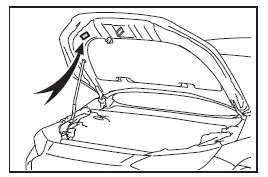
- The symbols displayed on the label provide important technical information regarding refrigerant type, handling precautions, and system specifications, which should be followed during maintenance or servicing.
Proper understanding and use of the Subaru Solterra climate control system will not only enhance passenger comfort but also help maintain energy efficiency and preserve long-term system performance.
 Caution
 Air
conditioning system
Air
conditioning system
 Air
conditioning system lubricant type
Air
conditioning system lubricant type
 Requires registered technician to service air conditioning system
 Flammable refrigerant
■ Noise from air conditioning system
In the Subaru Solterra, it is normal to hear operational sounds from the air conditioning system approximately 90 seconds after the power switch is turned OFF. This noise is associated with system initialization and internal processes and does not indicate any malfunction or defect.
■ Customization
The Subaru Solterra allows certain climate control and comfort-related functions to be customized according to driver preferences, providing a more personalized cabin experience.
WARNING
■ To prevent the windshield from fogging up
When operating the Subaru Solterra in highly humid conditions, avoid using the windshield defogger together with cool air mode.
A significant temperature difference between the outside air and the windshield surface may cause condensation to form on the exterior side of the glass, reducing visibility and potentially creating a hazardous driving situation.
■ To prevent burns
- Do not touch the outside rear view mirror surfaces while the mirror defoggers are active in the Subaru Solterra, as they may become hot.
- Avoid contact with the lower windshield area and the sections near the front pillars when the windshield wiper de-icer is operating, as these surfaces can also heat up.
NOTICE
■ To prevent 12-volt battery discharge
Do not leave the air conditioning system running longer than necessary when the Subaru Solterra EV system is turned off, as this may lead to unnecessary discharge of the 12-volt battery.
■ When repairing/replacing parts of the air conditioning system
All repair and replacement work for the Subaru Solterra air conditioning system should be carried out by an authorized SUBARU dealer or qualified technician.
Components such as the evaporator must be replaced with new parts to ensure correct system performance and safety compliance.
Using automatic mode
1. Press the ALL AUTO (ECO) switch in the Subaru Solterra. This activates the dehumidification function, and the system will automatically regulate airflow distribution and fan speed based on temperature and humidity conditions.
2. Set the desired temperature to achieve optimal cabin comfort.
3. To stop the system, press the "OFF" switch.
If the fan speed or airflow settings are manually adjusted, the automatic mode indicator will turn off. However, other automatic functions in the Subaru Solterra will continue operating unless individually overridden.
■ Using automatic mode
In automatic mode, the Subaru Solterra continuously adjusts fan speed according to the selected temperature and surrounding environmental conditions, ensuring a balanced and efficient climate inside the cabin.
It is normal for the fan to pause briefly after activation until the system prepares air at the appropriate temperature before directing it into the cabin.
Adjusting the temperature for driver and front passenger seats separately ("SYNC" mode)
The Subaru Solterra offers synchronized climate control through "SYNC" mode, allowing both driver and front passenger to maintain consistent temperature settings.
To activate "SYNC" mode, perform one of the following actions:
- Press the "SYNC" mode switch on the control panel.
- Adjust the temperature setting on the front passenger side.
When active, the indicator light will illuminate, confirming that synchronized temperature control is enabled in the Subaru Solterra.
Air outlet layout and operations
The air outlet system in the Subaru Solterra is designed to distribute airflow evenly and efficiently throughout the cabin, ensuring consistent comfort for all occupants while optimizing energy use and maintaining ideal interior conditions.
Proper understanding of these features in the Subaru Solterra allows for more effective climate control usage, improving both passenger comfort and overall system efficiency.
■ Location of air outlets
In the Subaru Solterra, the position of the air outlets and the volume of airflow are automatically adjusted depending on the selected airflow mode, ensuring balanced climate distribution throughout the cabin.
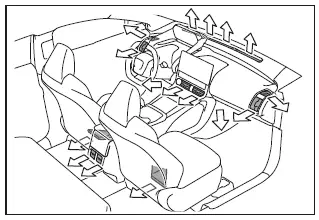
■ Adjusting the air flow direction and opening/closing the air outlets
Front
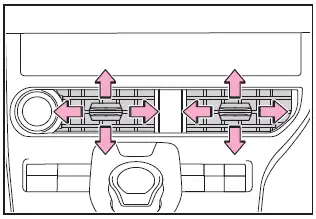
In the Subaru Solterra, the front air vents can be precisely adjusted to direct airflow left or right, as well as upward or downward, allowing the driver and front passenger to fine-tune airflow for maximum comfort.
To completely close a front vent, move the adjustment knob fully toward the outer position.
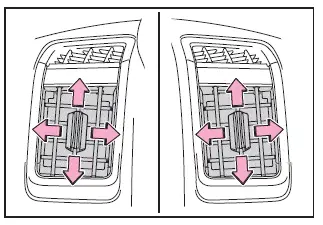
Airflow direction can also be modified vertically and horizontally depending on preference, ensuring flexible control of cabin ventilation in the Subaru Solterra.
Move the control knob fully downward to shut the vent completely when airflow is not required.
Rear
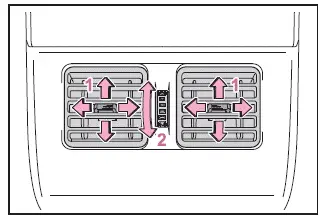
- Adjust airflow direction left, right, up, or down for rear passengers
- Rotate the control knob to open or close the rear air vents as needed
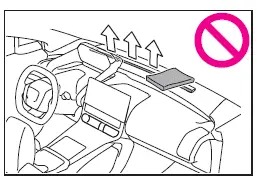
WARNING
■ To not interrupt the windshield defogger from operating
Do not place any objects on the instrument panel of the Subaru Solterra that may block the air outlets. Obstructed airflow can reduce the effectiveness of the windshield defogger and compromise visibility.
Front seat concentrated airflow mode (S-FLOW)
The Subaru Solterra features a front seat concentrated airflow mode (S-FLOW), which intelligently prioritizes airflow delivery to the front occupants. By limiting airflow to unoccupied areas, this system improves overall energy efficiency and helps extend the vehicle’s electric driving range.
S-FLOW mode automatically activates under the following conditions:
- No passengers are detected in the rear seating area
- The windshield defogger function is not in operation
When active, the corresponding indicator
 illuminates on the control panel.
■ Manually turning front seat concentrated airflow mode on/off
In the Subaru Solterra, S-FLOW mode can also be manually controlled. The driver can switch between directing airflow only to the front seats or distributing it to all seating positions using the climate control interface. When adjusted manually, automatic airflow optimization is temporarily disabled.
Use the air conditioning control panel to toggle airflow distribution:
- Indicator illuminated: Airflow directed to front seats only
- Indicator off: Airflow distributed to all seats
■ Operation of automatic airflow control
- To maintain a comfortable environment in the Subaru Solterra, airflow may occasionally be directed to unoccupied seats shortly after the EV system starts or depending on outside temperature conditions.
- If passengers frequently enter, exit, or move within the cabin, the system may not accurately detect occupancy, temporarily limiting automatic airflow adjustments.
■ Operation of manual airflow control
Even when manually set to supply airflow only to the front seats, the Subaru Solterra may automatically redistribute airflow to all seating positions if rear passengers are detected, ensuring adequate ventilation for all occupants.
■ To return to automatic airflow control
1. With the S-FLOW indicator turned off, switch the power OFF.
2. Wait at least 60 minutes, then restart the Subaru Solterra by turning the power switch to ON. This resets the system back to automatic airflow control mode.
The intelligent airflow management system in the Subaru Solterra enhances both passenger comfort and energy efficiency, adapting dynamically to occupancy and environmental conditions.
 ALL AUTO (ECO) control
In the Subaru Solterra, the ALL AUTO (ECO) control intelligently
manages interior comfort by automatically adjusting seat heaters/radiant heaters*,
seat ventilators*, and the heated steering wheel ...
 Remote Air Conditioning System
In the Subaru Solterra, the Remote Air Conditioning System utilizes
energy stored in the traction battery to allow the climate control system to be
activated remotely, providing a comfortable cabi ...
Other materials:
Drive Shaft Inspection
1. Inspect the connections for any looseness.
If there is any malfunction, tighten or replace the applicable part.
2. Inspect the dust boot for damage and cracks.
If there is any malfunction, replace the applicable part.
3. Move the spline and joint up and down, left ...
Voice Recognition Learning
Function (Speaker Enrollment)
(Type A)
The voice recognition learning function enables voice recognition appropriate
to the characteristics of the user's voice. If the recognition of the voice
input commands to the system is not adequate, this function can largely improve
the system's voice recognition of the user. If your voice ca ...
Warranties for Your Mazda
New Vehicle Limited Warranty
Powertrain Limited Warranty
Safety Restraint System Limited Warranty
Anti-perforation Limited Warranty
Federal Emission Control Warranty/California Emission Control Warranty
Emission Defect Warranty
Emission Performance Warranty
Emission Control ...
