
Mazda 3 Service Manual: Before Service Precaution [Mzr 2.0, Mzr 2.5]
WARNING:
-
Fuel vapor is hazardous. It can very easily ignite, causing serious injury and damage. Always keep sparks and flames away from fuel.
-
Fuel line spills and leakage from the pressurized fuel system are dangerous. Fuel can ignite and cause serious injury or death and damage. Fuel can also irritate skin and eyes. To prevent this, always complete the “Fuel Line Safety Procedure”.
-
A person charged with static electricity could cause a fire or explosion, resulting in death or serious injury. Before performing work on the fuel system, discharge static electricity by touching the vehicle body.
Fuel Line Safety Procedure
1. Remove the battery cover..
2. Disconnect the negative battery cable..
3. Remove the fuel-filler cap to release the pressure inside the fuel tank.
4. Remove the fuel pump relay.
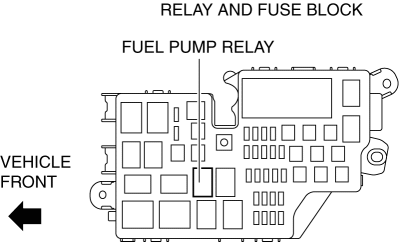
5. Connect the negative battery cable..
6. Start the engine.
7. After the engine stalls, crank the engine 2—3 times.
8. Switch the ignition to off.
9. Disconnect the negative battery cable..
10. Install the fuel pump relay.
 After Service Precaution [Mzr 2.0, Mzr 2.5]
WARNING:
Fuel line spills and leakage are dangerous. Fuel can ignite and cause serious
injuries or death and damage. When installing the fuel hose, perform “Fuel Leakage
Inspection” ...
 Fuel Filler Cap Inspection [Mzr 2.0, Mzr 2.5]
Leakage Inspection
1. Perform the following SST (Evaporative Emission System Tester 134-01049A)
self-test:
NOTE:
If the tester does not work correctly during self-test, refer to the teste ...
Other materials:
Engine Coolant Level Inspection [Mzr 2.0, Mzr 2.5]
WARNING:
Never remove the cooling system cap or loosen the radiator drain plug while
the engine is running, or when the engine and radiator are hot. Scalding engine
coolant and steam may shoot out and cause serious injury. It may also damage
the engine and cooling system.
Tu ...
Crankshaft Position (CKP) Sensor Removal/Installation [Mzr 2.0, Mzr 2.5]
Removal
CAUTION:
When foreign material such as an iron chip is on the CKP sensor, it can cause
abnormal output from the sensor because of flux turbulence and adversely affect
the engine control. Be sure there is no foreign material on the CKP sensor when
replacing.
Do not a ...
LCA (Lane Change Assist)
LCA functions
In the Subaru Solterra, the Lane Change Assist (LCA) system works in conjunction
with Lane Tracing Assist (LTA) to support smoother and more controlled lane changes.
By applying subtle steering inputs, the Subaru Solterra helps guide the vehicle
into the adjacent lane when condi ...
