
Mazda 3 Service Manual: Camshaft Position (CMP) Sensor Removal/Installation [Mzr 2.0, Mzr 2.5]
CAUTION:
-
When replacing the CMP sensor, make sure there is no foreign material on it such as metal shavings. If it is installed with foreign material, the sensor output signal will malfunction resulting from fluctuation in magnetic flux and cause a deterioration in engine control.
1. Remove the battery cover..
2. Disconnect the negative battery cable..
3. Remove the plug hole plate..
4. Disconnect the CMP sensor connector.
5. Remove the CMP sensor.
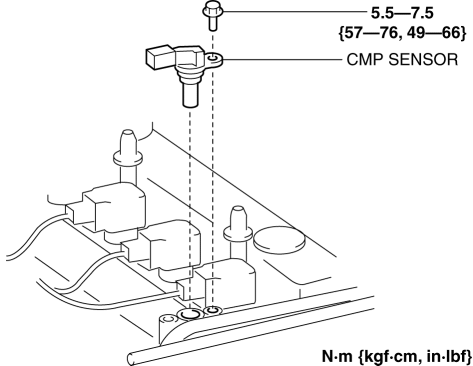
6. Install in the reverse order of removal.
 Camshaft Position (CMP) Sensor Inspection [Mzr 2.0, Mzr 2.5]
Visual Inspection
CAUTION:
When replacing the CMP sensor, make sure there is no foreign material on
it such as metal shavings. If it is installed with foreign material, the sensor
outpu ...
 Cylinder Head Gasket Replacement [Mzr 2.0, Mzr 2.5]
WARNING:
Fuel vapor is hazardous. It can very easily ignite, causing serious injury
and damage. Always keep sparks and flames away from fuel.
Fuel line spills and leakage are danger ...
Other materials:
Seat Weight Sensor Inspection [Two Step Deployment Control System]
CAUTION:
If any of the following work is performed, perform the seat weight sensor
inspection using the M-MDS.
Removal of the passenger-side seat
Loosening and retightening of passenger’s seat fixing bolts
Or, the vehicle is involved in a collision
...
Basic Operation Method
TOUCH & TAP
Touch or tap on the item indicated on the screen.
The operation is launched and the next item is displayed.
SLIDE
Touch the setting item displaying a slider bar.
Touch the slider with your finger and move to the desired level.
SWIPE
Touch the screen with ...
Rear Wiper Motor Inspection
1. Disconnect the negative battery cable..
2. Remove the following parts:
a. Rear wiper arm and blade.
b. Liftgate upper trim.
c. Liftgate side trim.
d. Liftgate lower trim.
3. Disconnect the rear wiper motor connector.
4. Apply battery positive voltage to rear wiper motor connector te ...
