
Mazda 3 Service Manual: Clock Spring Inspection [Standard Deployment Control System]
1. Disconnect the negative battery cable..
2. Remove the driver–side air bag module..
3. Remove the steering wheel..
4. Remove the column cover.
5. Remove the clock spring..
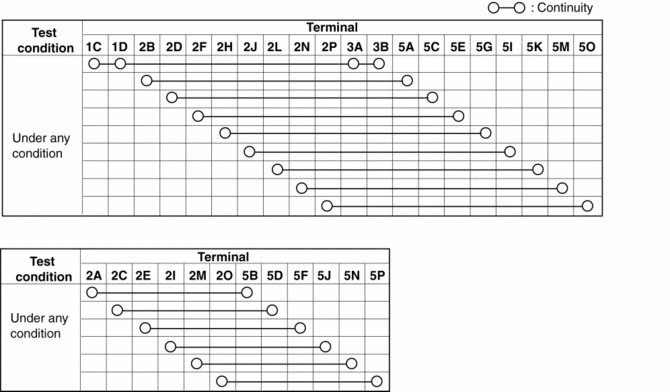
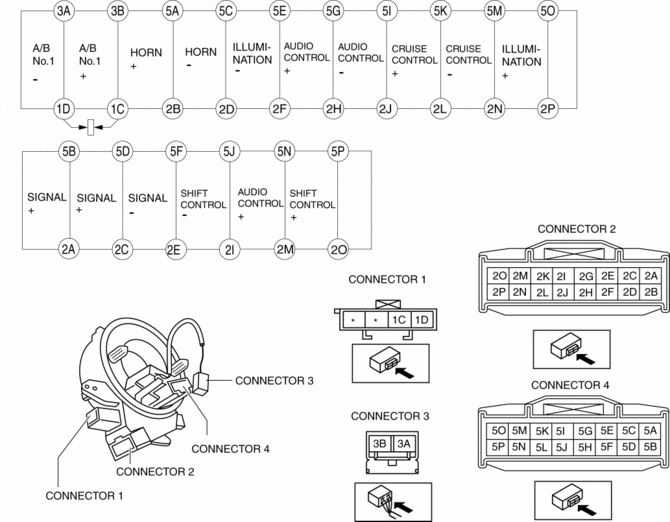
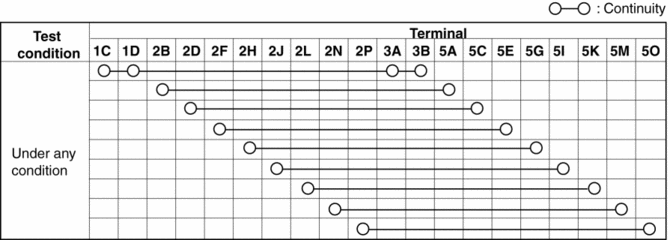
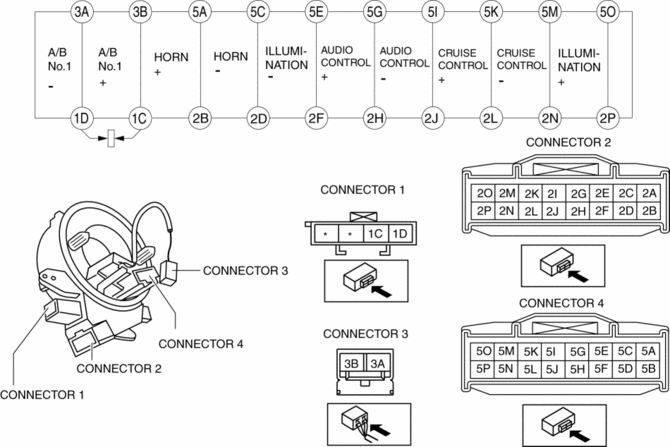
6. Verify that the continuity is as indicated in the table.
-
If not as indicated in the table, replace the clock spring.
NOTE:
-
When the vehicle-side connector for the clock spring is disconnected, terminals 1C and 1D are shorted to prevent unexpected operation (deployment) of the air bag module.
Vehicles with steering switch
Vehicles without steering switch
 Barometric Pressure (Baro) Sensor Inspection [Mzr 2.0, Mzr 2.5]
Voltage Inspection
NOTE:
Because the BARO sensor is integrated in the PCM, replacing the BARO sensor
includes replacement of the PCM.
1. Connect the M-MDS to the DLC–2.
2. Sw ...
 Clock Spring Inspection [Two Step Deployment Control System]
1. Disconnect the negative battery cable..
2. Remove the driver–side air bag module..
3. Remove the steering wheel..
4. Remove the column cover.
5. Remove the clock spring..
6. Verify that ...
Other materials:
Front Bumper Removal/Installation
1. Disconnect the negative battery cable..
2. Remove the screw A and fasteners B.
3. Remove the screws C.
4. Remove the bolts D.
5. Remove the fasteners E, screw F and fastener G.
6. Pull the front bumper in the direction of the arrow in the order of (1), (2)
and (3), the ...
Barometric Pressure (Baro) Sensor Inspection [Mzr 2.0, Mzr 2.5]
Voltage Inspection
NOTE:
Because the BARO sensor is integrated in the PCM, replacing the BARO sensor
includes replacement of the PCM.
1. Connect the M-MDS to the DLC–2.
2. Switch the ignition to ON.
3. Verify that the BARO sensor output voltage (PID: BARO) is within the s ...
Smart City Brake Support
(SCBS)
The Smart City Brake Support (SCBS) system is designed to reduce damage in
the event
of a collision by operating the brake control (SCBS brake) when the system's
laser sensor
(front) detects a vehicle ahead and determines that a collision with a vehicle
ahead is
unavoidable. It may also be ...
